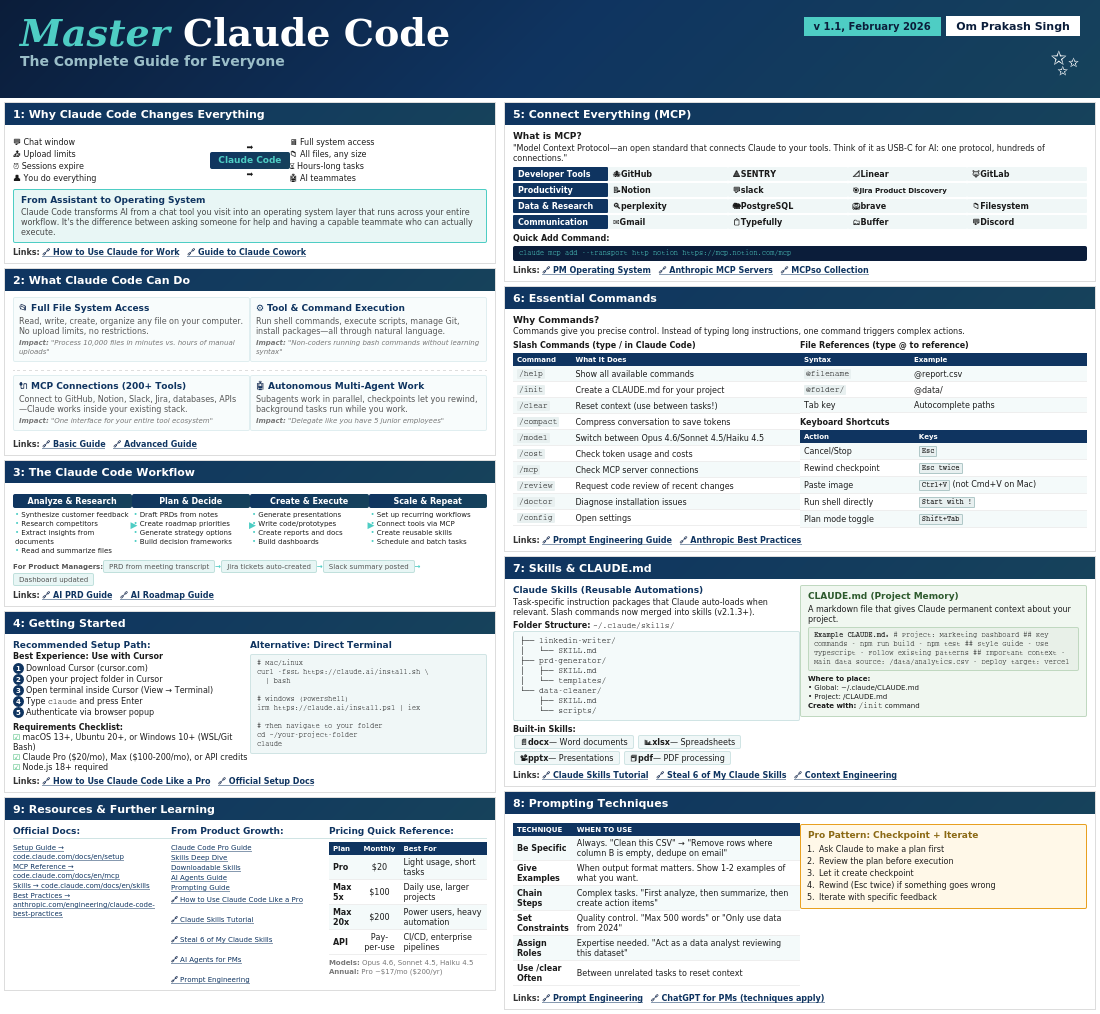
Master Claude Code
The Complete Guide for Everyone
v 1.1, February 2026
Om Prakash Singh
✨
1: Why Claude Code Changes Everything
💬 Chat window
📤 Upload limits
⏰ Sessions expire
👤 You do everything
📤 Upload limits
⏰ Sessions expire
👤 You do everything
➡️
Claude Code
➡️
🖥️ Full system access
📁 All files, any size
⏳ Hours-long tasks
🤖 AI teammates
📁 All files, any size
⏳ Hours-long tasks
🤖 AI teammates
From Assistant to Operating System
Claude Code transforms AI from a chat tool you visit into an operating system layer that runs across your entire workflow. It’s the difference between asking someone for help and having a capable teammate who can actually execute.
2: What Claude Code Can Do
📂 Full File System Access
Read, write, create, organize any file on your computer. No upload limits, no restrictions.
Impact: “Process 10,000 files in minutes vs. hours of manual uploads”
⚙️ Tool & Command Execution
Run shell commands, execute scripts, manage Git, install packages—all through natural language.
Impact: “Non-coders running bash commands without learning syntax”
🔌 MCP Connections (200+ Tools)
Connect to GitHub, Notion, Slack, Jira, databases, APIs—Claude works inside your existing stack.
Impact: “One interface for your entire tool ecosystem”
🤖 Autonomous Multi-Agent Work
Subagents work in parallel, checkpoints let you rewind, background tasks run while you work.
Impact: “Delegate like you have 5 junior employees”
Links: 🔗 Basic Guide 🔗 Advanced Guide
3: The Claude Code Workflow
Analyze & Research
- Synthesize customer feedback
- Research competitors
- Extract insights from documents
- Read and summarize files
Plan & Decide
- Draft PRDs from notes
- Create roadmap priorities
- Generate strategy options
- Build decision frameworks
Create & Execute
- Generate presentations
- Write code/prototypes
- Create reports and docs
- Build dashboards
Scale & Repeat
- Set up recurring workflows
- Connect tools via MCP
- Create reusable skills
- Schedule and batch tasks
For Product Managers:
PRD from meeting transcript
→
Jira tickets auto-created
→
Slack summary posted
→
Dashboard updated
Links: 🔗 AI PRD Guide 🔗 AI Roadmap Guide
4: Getting Started
Recommended Setup Path:
Best Experience: Use with Cursor
Best Experience: Use with Cursor
1Download Cursor (cursor.com)
2Open your project folder in Cursor
3Open terminal inside Cursor (View → Terminal)
4Type
5Authenticate via browser popup
2Open your project folder in Cursor
3Open terminal inside Cursor (View → Terminal)
4Type
claude and press Enter5Authenticate via browser popup
Requirements Checklist:
☑ macOS 13+, Ubuntu 20+, or Windows 10+ (WSL/Git Bash)
☑ Claude Pro ($20/mo), Max ($100-200/mo), or API credits
☑ Node.js 18+ required
☑ macOS 13+, Ubuntu 20+, or Windows 10+ (WSL/Git Bash)
☑ Claude Pro ($20/mo), Max ($100-200/mo), or API credits
☑ Node.js 18+ required
Alternative: Direct Terminal
# Mac/Linux
curl -fsSL https://claude.ai/install.sh \
| bash
# Windows (PowerShell)
irm https://claude.ai/install.ps1 | iex
# Then navigate to your folder
cd ~/your-project-folder
claude
9: Resources & Further Learning
Official Docs:
Setup Guide → code.claude.com/docs/en/setup MCP Reference → code.claude.com/docs/en/mcp Skills → code.claude.com/docs/en/skills Best Practices → anthropic.com/engineering/claude-code-best-practicesFrom Product Growth:
Claude Code Pro Guide Skills Deep Dive Downloadable Skills AI Agents Guide Prompting GuidePricing Quick Reference:
| Plan | Monthly | Best For |
|---|---|---|
| Pro | $20 | Light usage, short tasks |
| Max 5x | $100 | Daily use, larger projects |
| Max 20x | $200 | Power users, heavy automation |
| API | Pay-per-use | CI/CD, enterprise pipelines |
Models: Opus 4.6, Sonnet 4.5, Haiku 4.5
Annual: Pro ~$17/mo ($200/yr)
Annual: Pro ~$17/mo ($200/yr)
5: Connect Everything (MCP)
What is MCP?
Quick Add Command:
“Model Context Protocol—an open standard that connects Claude to your tools. Think of it as USB-C for AI: one protocol, hundreds of connections.”
Developer Tools
🐙 GitHub
🔺 SENTRY
📐 Linear
🦊 GitLab
Productivity
📝 Notion
💬 slack
🎯 Jira Product Discovery
Data & Research
🔍 perplexity
🐘 PostgreSQL
🦁 brave
📁 Filesystem
Communication
✉️ Gmail
📋 Typefully
🗂️ Buffer
💬 Discord
claude mcp add –transport http notion https://mcp.notion.com/mcp
6: Essential Commands
Why Commands?
Commands give you precise control. Instead of typing long instructions, one command triggers complex actions.
Slash Commands (type / in Claude Code)
| Command | What It Does |
|---|---|
/help | Show all available commands |
/init | Create a CLAUDE.md for your project |
/clear | Reset context (use between tasks!) |
/compact | Compress conversation to save tokens |
/model | Switch between Opus 4.6/Sonnet 4.5/Haiku 4.5 |
/cost | Check token usage and costs |
/mcp | Check MCP server connections |
/review | Request code review of recent changes |
/doctor | Diagnose installation issues |
/config | Open settings |
File References (type @ to reference)
Keyboard Shortcuts
| Syntax | Example |
|---|---|
@filename | @report.csv |
@folder/ | @data/ |
| Tab key | Autocomplete paths |
| Action | Keys |
|---|---|
| Cancel/Stop | Esc |
| Rewind checkpoint | Esc twice |
| Paste image | Ctrl+V (not Cmd+V on Mac) |
| Run shell directly | Start with ! |
| Plan mode toggle | Shift+Tab |
7: Skills & CLAUDE.md
Claude Skills (Reusable Automations)
Task-specific instruction packages that Claude auto-loads when relevant. Slash commands now merged into skills (v2.1.3+).
Folder Structure:~/.claude/skills/
├── linkedin-writer/
│ └── SKILL.md
├── prd-generator/
│ ├── SKILL.md
│ └── templates/
└── data-cleaner/
├── SKILL.md
└── scripts/
Built-in Skills:
📄 docx — Word documents
📊 xlsx — Spreadsheets
📽️ pptx — Presentations
📕 pdf — PDF processing
│ └── SKILL.md
├── prd-generator/
│ ├── SKILL.md
│ └── templates/
└── data-cleaner/
├── SKILL.md
└── scripts/
CLAUDE.md (Project Memory)
A markdown file that gives Claude permanent context about your project.
Example CLAUDE.md:
# Project: Marketing Dashboard
## Key Commands
– npm run build
– npm test
## Style Guide
– Use TypeScript
– Follow existing patterns
## Important Context
– Main data source: /data/analytics.csv
– Deploy target: Vercel
Where to place:
• Global: ~/.claude/CLAUDE.md
• Project: /CLAUDE.md
Create with:
• Global: ~/.claude/CLAUDE.md
• Project: /CLAUDE.md
Create with:
/init command
8: Prompting Techniques
| TECHNIQUE | WHEN TO USE |
|---|---|
| Be Specific | Always. “Clean this CSV” → “Remove rows where column B is empty, dedupe on email” |
| Give Examples | When output format matters. Show 1-2 examples of what you want. |
| Chain Steps | Complex tasks. “First analyze, then summarize, then create action items” |
| Set Constraints | Quality control. “Max 500 words” or “Only use data from 2024” |
| Assign Roles | Expertise needed. “Act as a data analyst reviewing this dataset” |
| Use /clear Often | Between unrelated tasks to reset context |
Pro Pattern: Checkpoint + Iterate
- Ask Claude to make a plan first
- Review the plan before execution
- Let it create checkpoint
- Rewind (Esc twice) if something goes wrong
- Iterate with specific feedback