Tag: 203

  • Free HTTPS for your website!!

    Free HTTPS for your website!!

    I know we are not big enterprise who can buy SSL certificates and done with it.

    For small bloggers like me and you it becomes challenging Day by Day to keep up with Google’s changing policies. Apart from Google’s policies, it is also important to keep our site secure running and ranking in Google.

    Enabling SSL on your website is another SEO trick to rank in google.

    I tried to write down the steps for setting up yourself with cloudflare and get free https, for the impatient you can directly go to the section for cloudflare.

    Google wants us to use https to rank our site, they prioritize HTTPS over HTTP and when you are hosting your personal website/blog site on Github you should use https.

    With CloudFlare DNS service and your Github custom domain this will speed up your site and make it load faster on the browser since CloudFlare is going to cache your site and service the request from the nearest cached site your site will load much faster.

    I have been at this point where I want to migrate from my Github Pages blog from http to https for the obvious advantages of using https,

    From Github blog

    HTTPS (most recognizable as the lock icon in your browser’s address bar) encrypts traffic between GitHub’s servers and your browser giving you confidence that the page you asked for is the page you’re reading, from the site you think it is, and that others can’t snoop on or modify its contents along the way.

    This led me to search google and the solution was well hidden in on one of the Github issues hence I am making this ready guide for reference.

    Github has native support for *.github.io domains from 2016. They finally enabled https support for a custom domain in 2018 partnering with Let’s Encrypt as the certificate authority.

    Benefits of using Github?

    • It’s Superfast
    • Easy to setup
    • site deployment is just a git push away.
    • and has braved the worlds biggest DDOS attack.

    Benefits of using CloudFlare

    • Speed up your site.
    • Fast, Global CDN.
    • Ensure Application Availability
    • Auto minify your site
    • custom redirect rules.

    I am assuming you have your Github account handy and now you need to go ahead and make your Cloudflare account. If you have never set up Github pages, please follow this guide to help you with.

    once ready. Let’s

    Configure Github Pages

    Go to your Github repository and settings, we need to make sure our repository using the custom domain name and using https.
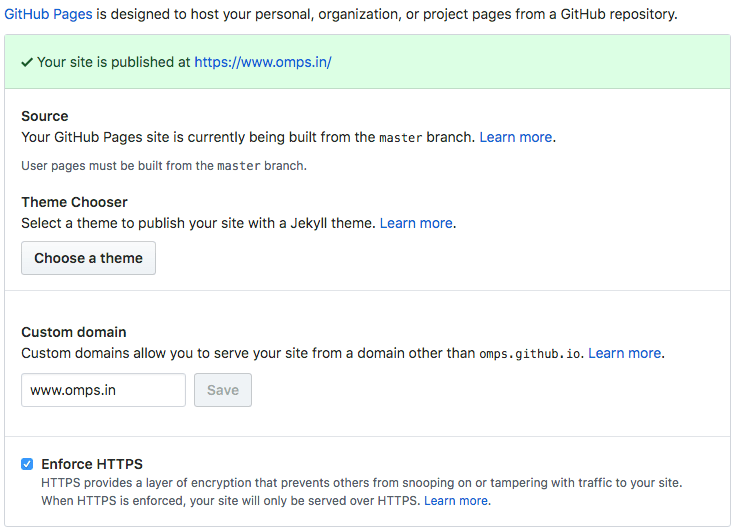
    cloudflare_cname

    Save. That’s it and we are done.

    Configure Hosting Providers DNS Server.

    If you are using CNAME or ALIAS records for your custom domain, you’re all set and your site should be accessible over HTTPS. If it is, and your site loads correctly over HTTPS.

    In case you are using A record Github requires you to modify your registrar’s A records to match with new IP addresses.

    If you have previously configured Github pages, you could recall that for HTTP requests GitHub uses the following IP addresses.

    1
    2
    
    192.30.252.153
    192.30.252.154
    

    and this needs to be updated with the new https record which GitHub provides as.

    1
    2
    3
    4
    
    185.199.108.153
    185.199.109.153
    185.199.110.153
    185.199.111.153
    

    and should look like this

    omps.in_a_record

    run dig command to check if the records are updated. omps.in$ dig +noall +answer omps.in omps.in. 300 IN A 104.31.70.126 omps.in. 300 IN A 104.31.71.126

    after this, you need to remove the CNAME file from your repository and do a GitHub push. re-add the cname fine and do a git push to the master. This will help refresh Github’s CNAME record.

    Configuring CloudFlare

    Login to CloudFlare and set up a new site, for our custom domain name. In the end, we need to update our hosting provider’s domain name settings to use CloudFlare DNS instead of the current ones. CloudFlare will then import all our existing configuration on to their servers.

    Just ensure that www CNAME record redirects to your GitHub pages URL. CNAME is just an alias. In this case, we tell DNS to respond address of omps.github.io whenever omps.in is queried.

    cloudflare_cname

    Forcing HTTPS

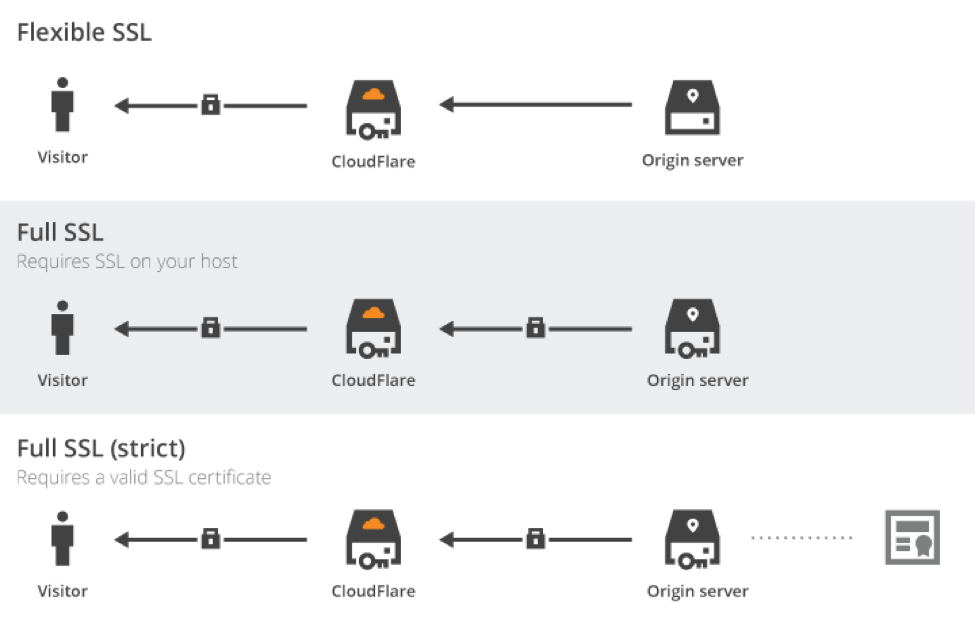
    Now that CloudFlare handles our DNS, we need to force all requests to use HTTPs. On the Crypto tab, just change the SSL option to Full. To better understand each of these options, here is a picture taken from the CloudFlare blog:
    cloudflare_flexible_ssl

    With flexible SSL, all communications between CloudFlare servers and GitHub ones are not encrypted. Not really secured, even if your domain would be served in HTTPs.

    However, full modes encrypt all communication streams, even behind CloudFlare servers. In this case, the hosting server needs to supports SSL. We need to stay in loose mode, as GitHub won’t validate the SSL certificate with a custom domain name.

    Our site is now (depending on DNS propagation time, up to 48 hours) served in HTTPs and is compatible with faster HTTP/2.

    Force Redirection to HTTPs Version

    We are going to add three rules for our domain (fortunately, we get three free rules with the free plan):

    omps_in_page_rules

    First one enables caching on all URL, Second one redirect permanently URL without www to the one with www, Last one to force the use of https everywhere. As a result, even if we mistakenly go on http://omps.in, we will be redirected to a cached version of https://omps.in.

    Note the use of the wildcard * on all rules to match every URL. You can retrieve the value replaced by the wildcard using the regex-like [$1, $2, …] arguments.

    About CloudFlare Caching

    CloudFlare is also a CDN (Content Delivery Network). It has a lot of servers around the world and optimizes the way it delivers our data. To take advantage of it, we just had to enable caching using page rules. We can configure it more finely via the Caching tab.

    We cache every request to GitHub for 4 hours (by default). Instead, all our requests would be served by the closest CloudFlare CDN server, saving fractions of seconds of international data transit. Our static website is already blazing fast, let’s increase again its reactivity.

    As we asked for a total cache, we need to purge cached pages at each change. We can either do it using CloudFlare built-in API or manually. As I don’t publish several posts a day, I can wait a few hours before seeing my post is publicly available. Or I just purge the cache using CloudFlare user interface.

    Purging CloudFlare Cache

    Note there is also a Development Mode feature. It simply disables the cache layer, allowing you to check in realtime all your changes. It is especially useful if you need to debug in production. But nobody does this kind of thing, right? 😉

    Now once again we collect the CloudFlare nameservers,

    cloudflare_ns_servers

    go back to our hosting provider and update the NS records.

    update_registrar_ns_records

    While going through this is pretty simple, I must warn you that it will take around 24/48 HRS for the changes to propagate fully, so don’t be impatient and wait. Once your changes are reflected, you would see a much faster response.

  • How to Setup a Personal Static blog with Github Pages

    How to Setup a Personal Static blog with Github Pages

    What is Github

    Github is a code hosting platform for collaboration and version control using git which is quite similar to SVN and Mercurial.

    Github allows us to work with other developers together on the projects.

    You can sign up for github at https://github.com

    Github_account

    Essential components of Github are:

    1. Repositories
    2. Branches
    3. Commits
    4. Pull Request
    5. Git (The version control software Github is built on.)

    To learn more about git do visit the git-scm page.

    What is Github pages.

    GitHub Pages is a static site hosting service designed to host your personal, organization, or project pages directly from a GitHub repository.

    Basically with Github pages you can host your static HTML site, like your portfolio, your blog on an information site, which do not require a lot of content-changes very frequently.

    GitHub Pages is a static site hosting service and doesn’t support server-side code such as, PHP, Ruby, or Python.

    We can use programming languages such as Ruby and Python to generate static sites, which can then be pushed into your repositories.


    You must not use github pages as a free hosting service, their term place certain usage limit as follows:

    • GitHub Pages source repositories have a recommended limit of 1GB .
    • Published GitHub Pages sites may be no larger than 1 GB.
    • GitHub Pages sites have a soft bandwidth limit of 100GB per month.
    Any commercial transaction or commercial software on GH Pages restrain a soft limit. E-commerce sites, online businesses and websites with commercial transactions falls into this category.

    imitations

    GH Pages sites are subject to the following usage limits:

    • The source repositories hosting your blog have a recommended limit of 1GB .
    • Published sites cannot be no larger than 1 GB.
    • The sites will have a soft bandwidth limit of 100GB per month.
    • And your site will only be build for 10 times in an hour, if you are using Jekyll or pelican as static site generator.

    While you have hosted your content on the GitHub pages. Please also make sure you follow these guidelines and must refrain from:

    • Content or activity that is illegal or otherwise prohibited by our Terms of Service or Community Guidelines
    • Violent or threatening content or activity
    • Excessive automated bulk activity (for example, spamming)
    • Activity that compromises GitHub users or GitHub services
    • Get-rich-quick schemes
    • Sexually obscene content
    • Content that misrepresents your identity or site purpose

    Why Github Pages

    GitHub pages uses static sites technically, a static website is only HTML and CSS and doesn’t involve scripting. To change the content which appears source code needs to be edited directly. In simple words, the content of the website will remain same for every visit whereas for dynamic sites the content will keep on changing. For e.g. the news feed of facebook is a dynamic site, but book review site can be a static site, since the content remains constant for somtime. There are many reasons which makes a static site desirable than a dynamic site as follows:

    1. Security

    Static websites are usually safe when compared to dynamic websites. APIs and Java script handle the dynamic functions of Static sites, eliminating the risk of getting hacked.
    Dynamic website but are more prone to get hacked due to many content sources and plugins.

    A WP WhiteSecurity report states that about 70% of WordPress sites are at risk of getting hacked by malicious hackers because of lack of maintenance and upgrading. Ugh, scary.

    2. Reliability

    At times we must have come across this error message “The connection could not be established“. This happens because of errors with databases.
    Service basic HTML files makes it a lot easier to host them anywhere with ease like on a CDN.
    During an attack on the server, the request for static site redirects to another closest node, whereas dynamic sites could go down for few hours.

    3. Speed

    The absence of middleman/database makes the static site much more speedy and easy to load. A static site is ten times faster than a dynamic site that is built with a CMS. Another reason for a static website to run faster is that it can be served from the node closest to the browser.

    According to research by Kissmetrics, about 47% of people expect the website to load within 2 seconds, and a whopping 40% of people will not wait for the website to load for longer than 3 seconds. Hence, getting a static website also helps in getting more traffic by reducing abandonment rate caused due to slow loading.

    Page Load Time

    Hosting and Price

    Static websites have basic HTML files which require less space making the hosting of these websites cheaper to that of dynamic websites. Organizations with static website save up on the costs and channel those resources to integrate Git or automated builds to incorporate the latest changes in the system.

    Scalability

    What to do when your website is finally up and running? Handling massive traffic on a dynamic website might be a cumbersome process as it requires complex code playing on the server. Static websites which are only HTML files can be easily scaled up by just increasing the bandwidth.

    Technological advancements.

    There was a time when online store websites would have to rely on dynamic websites for their organization and integrate those complex coding and deal with tedious scripting.

    With tools like Magento, it is possible to have a static website for shop-centric businesses. A Java-script based shopping cart, called Snipcart, integrates e-commerce site’s functionalities to a static website, eliminating the need for dynamic websites. Snipcart dashboard can manage sales and product inventories, and its API can be integrated with shipping service providers and inventory management software systems as well.

    With some static generators and static website hosting platforms that allow Github integration, global CDN, SSL certificates along with free custom domains. Hosting providers such Netlify, go up the notch and even deal with redirects such as 404 errors, proxies, and even password protection.

    Therefore, it is safe to say that static websites have made a terrific comeback and they are here to stay with more advantages than drawbacks. As a website is a digital face of the business, organizations must take into consideration all the factors and necessities of their business website and must assess all the new tools and platforms before making a website.

    online stores

    What are the requirements for hosting on github pages

    • You need to have a github account, register here.
    • enable gh-pages for your repository.
    • you can access the repository as .github.io

    How to Do GitHub hosting.

    Create a repository

    Head over to GitHub and create a new repository named username.github.io, where username is your username (or organization name) on GitHub. Create repository If the first part of the repository doesn’t exactly match your username, it won’t work, so make sure to get it right.

    Clone the repository

    Go to the folder where you want to store your project, and clone the new repository:

    1
    
    ~ $ git clone https://github.com/username/username.github.io    
    

    Hello World

    Enter the project folder and add an index.html file:

    1
    2
    
    ~ $ cd username.github.io
    ~ $ echo "Hello World" > index.html
    

    Push it

    Add, commit, and push your changes:

    1
    2
    3
    
    ~ $ git add --all
    ~ $ git commit -m "Initial commit"
    ~ $ git push -u origin master
    

    …and you’re done!

    Fire up a browser and go to https://username.github.io.

    Once this is done learn to set your custom domain.Github Pages