Category: AI

  • Claude Cheat Sheet

    Claude Cheat Sheet

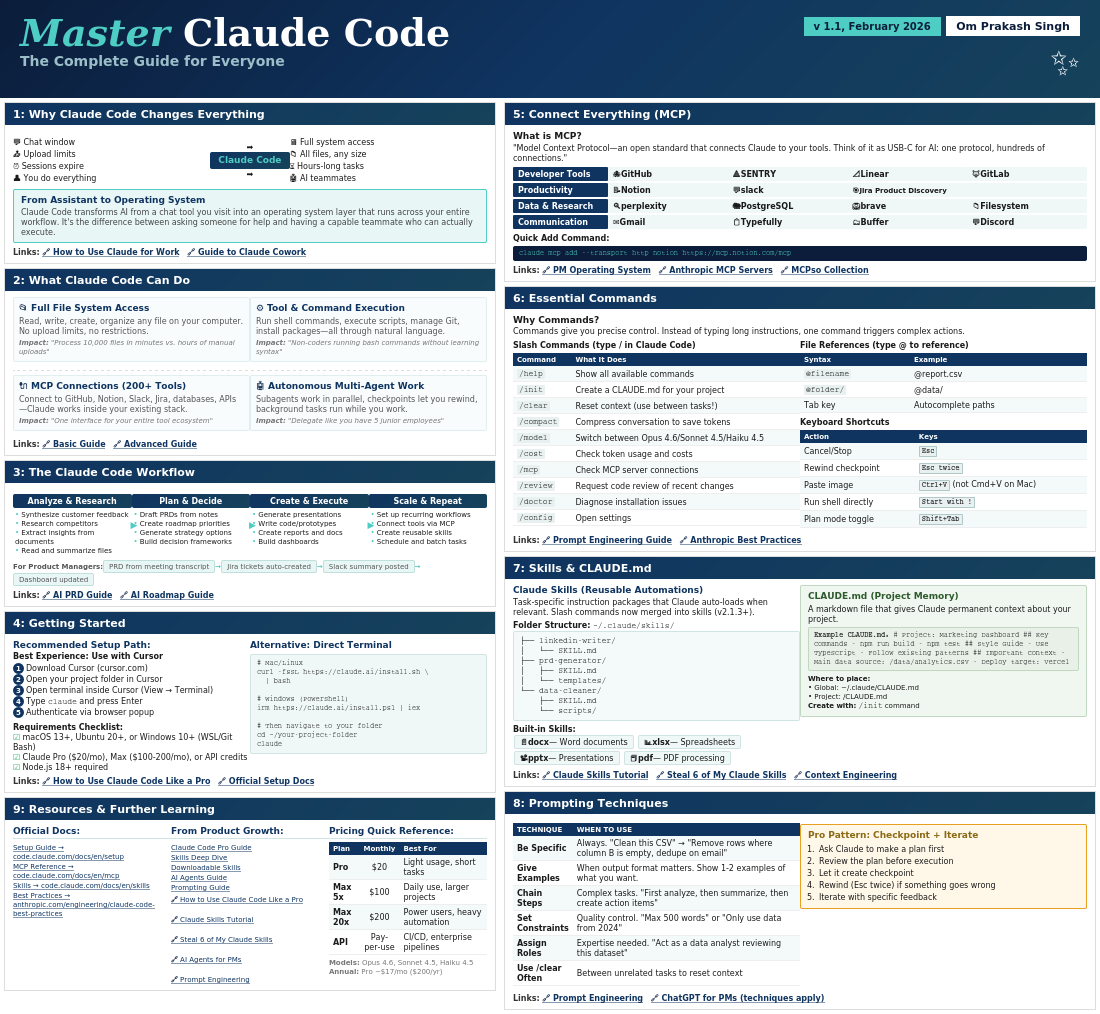
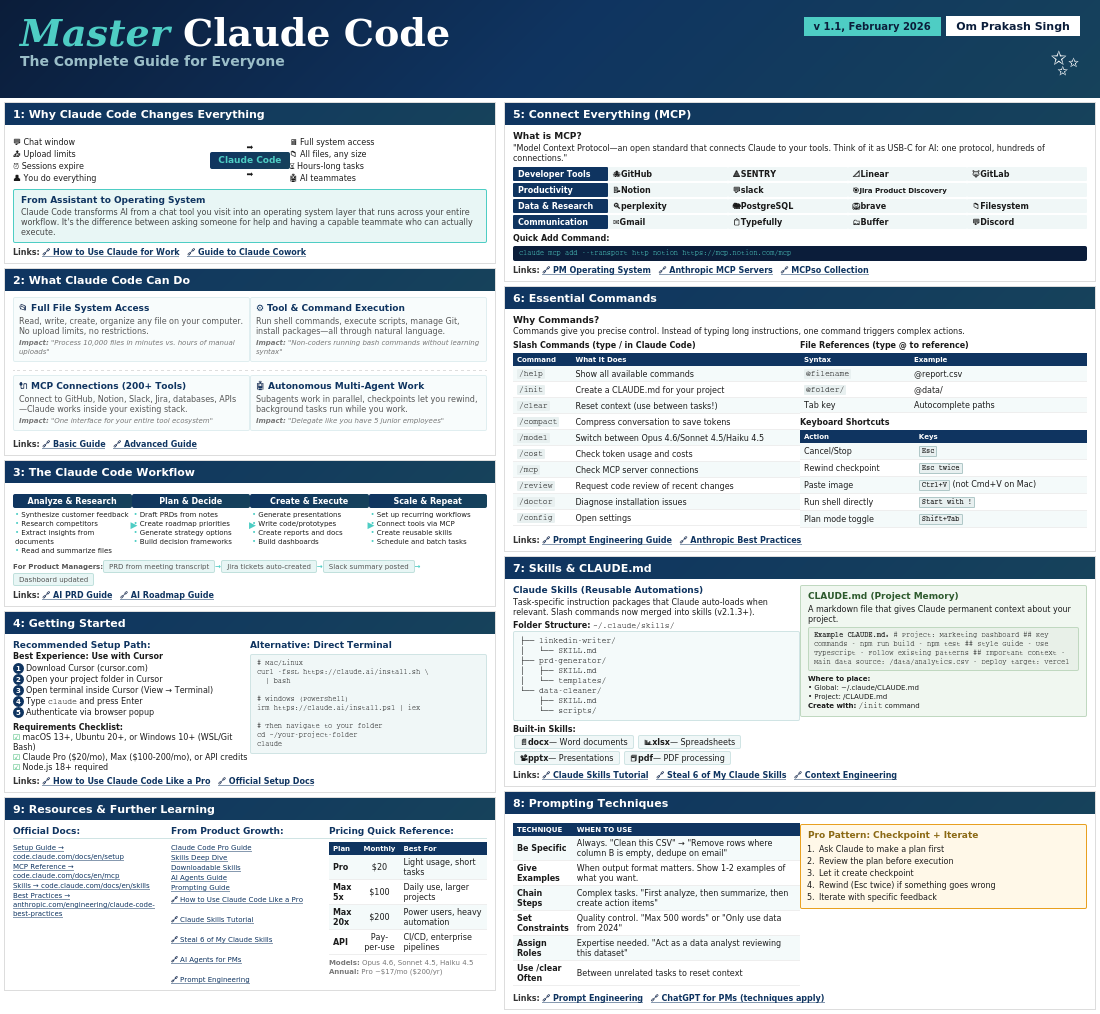
    Master Claude Code – Om Prakash Singh

    Master Claude Code

    The Complete Guide for Everyone

    v 1.1, February 2026 Om Prakash Singh
    1: Why Claude Code Changes Everything
    💬 Chat window
    📤 Upload limits
    ⏰ Sessions expire
    👤 You do everything
    ➡️
    Claude Code
    ➡️
    🖥️ Full system access
    📁 All files, any size
    ⏳ Hours-long tasks
    🤖 AI teammates
    From Assistant to Operating System

    Claude Code transforms AI from a chat tool you visit into an operating system layer that runs across your entire workflow. It’s the difference between asking someone for help and having a capable teammate who can actually execute.

    2: What Claude Code Can Do

    📂 Full File System Access

    Read, write, create, organize any file on your computer. No upload limits, no restrictions.
    Impact: “Process 10,000 files in minutes vs. hours of manual uploads”

    ⚙️ Tool & Command Execution

    Run shell commands, execute scripts, manage Git, install packages—all through natural language.
    Impact: “Non-coders running bash commands without learning syntax”

    🔌 MCP Connections (200+ Tools)

    Connect to GitHub, Notion, Slack, Jira, databases, APIs—Claude works inside your existing stack.
    Impact: “One interface for your entire tool ecosystem”

    🤖 Autonomous Multi-Agent Work

    Subagents work in parallel, checkpoints let you rewind, background tasks run while you work.
    Impact: “Delegate like you have 5 junior employees”
    3: The Claude Code Workflow
    Analyze & Research
    • Synthesize customer feedback
    • Research competitors
    • Extract insights from documents
    • Read and summarize files
    Plan & Decide
    • Draft PRDs from notes
    • Create roadmap priorities
    • Generate strategy options
    • Build decision frameworks
    Create & Execute
    • Generate presentations
    • Write code/prototypes
    • Create reports and docs
    • Build dashboards
    Scale & Repeat
    • Set up recurring workflows
    • Connect tools via MCP
    • Create reusable skills
    • Schedule and batch tasks
    For Product Managers: PRD from meeting transcript Jira tickets auto-created Slack summary posted Dashboard updated
    4: Getting Started
    Recommended Setup Path:
    Best Experience: Use with Cursor
    1Download Cursor (cursor.com)
    2Open your project folder in Cursor
    3Open terminal inside Cursor (View → Terminal)
    4Type claude and press Enter
    5Authenticate via browser popup
    Requirements Checklist:
    macOS 13+, Ubuntu 20+, or Windows 10+ (WSL/Git Bash)
    Claude Pro ($20/mo), Max ($100-200/mo), or API credits
    Node.js 18+ required
    Alternative: Direct Terminal
    # Mac/Linux curl -fsSL https://claude.ai/install.sh \ | bash # Windows (PowerShell) irm https://claude.ai/install.ps1 | iex # Then navigate to your folder cd ~/your-project-folder claude
    9: Resources & Further Learning

    Pricing Quick Reference:

    PlanMonthlyBest For
    Pro$20Light usage, short tasks
    Max 5x$100Daily use, larger projects
    Max 20x$200Power users, heavy automation
    APIPay-per-useCI/CD, enterprise pipelines
    Models: Opus 4.6, Sonnet 4.5, Haiku 4.5
    Annual: Pro ~$17/mo ($200/yr)
    5: Connect Everything (MCP)
    What is MCP?

    “Model Context Protocol—an open standard that connects Claude to your tools. Think of it as USB-C for AI: one protocol, hundreds of connections.”

    Developer Tools
    🐙 GitHub
    🔺 SENTRY
    📐 Linear
    🦊 GitLab
    Productivity
    📝 Notion
    💬 slack
    🎯 Jira Product Discovery
    Data & Research
    🔍 perplexity
    🐘 PostgreSQL
    🦁 brave
    📁 Filesystem
    Communication
    ✉️ Gmail
    📋 Typefully
    🗂️ Buffer
    💬 Discord
    Quick Add Command:
    claude mcp add –transport http notion https://mcp.notion.com/mcp
    6: Essential Commands
    Why Commands?

    Commands give you precise control. Instead of typing long instructions, one command triggers complex actions.

    Slash Commands (type / in Claude Code)
    CommandWhat It Does
    /helpShow all available commands
    /initCreate a CLAUDE.md for your project
    /clearReset context (use between tasks!)
    /compactCompress conversation to save tokens
    /modelSwitch between Opus 4.6/Sonnet 4.5/Haiku 4.5
    /costCheck token usage and costs
    /mcpCheck MCP server connections
    /reviewRequest code review of recent changes
    /doctorDiagnose installation issues
    /configOpen settings
    File References (type @ to reference)
    SyntaxExample
    @filename@report.csv
    @folder/@data/
    Tab keyAutocomplete paths
    Keyboard Shortcuts
    ActionKeys
    Cancel/StopEsc
    Rewind checkpointEsc twice
    Paste imageCtrl+V (not Cmd+V on Mac)
    Run shell directlyStart with !
    Plan mode toggleShift+Tab
    7: Skills & CLAUDE.md
    Claude Skills (Reusable Automations)

    Task-specific instruction packages that Claude auto-loads when relevant. Slash commands now merged into skills (v2.1.3+).

    Folder Structure: ~/.claude/skills/
    ├── linkedin-writer/
    │   └── SKILL.md
    ├── prd-generator/
    │   ├── SKILL.md
    │   └── templates/
    └── data-cleaner/
        ├── SKILL.md
        └── scripts/
    Built-in Skills: 📄 docx — Word documents 📊 xlsx — Spreadsheets 📽️ pptx — Presentations 📕 pdf — PDF processing

    CLAUDE.md (Project Memory)

    A markdown file that gives Claude permanent context about your project.

    Example CLAUDE.md: # Project: Marketing Dashboard ## Key Commands – npm run build – npm test ## Style Guide – Use TypeScript – Follow existing patterns ## Important Context – Main data source: /data/analytics.csv – Deploy target: Vercel
    Where to place:
    • Global: ~/.claude/CLAUDE.md
    • Project: /CLAUDE.md
    Create with: /init command
    8: Prompting Techniques
    TECHNIQUEWHEN TO USE
    Be SpecificAlways. “Clean this CSV” → “Remove rows where column B is empty, dedupe on email”
    Give ExamplesWhen output format matters. Show 1-2 examples of what you want.
    Chain StepsComplex tasks. “First analyze, then summarize, then create action items”
    Set ConstraintsQuality control. “Max 500 words” or “Only use data from 2024”
    Assign RolesExpertise needed. “Act as a data analyst reviewing this dataset”
    Use /clear OftenBetween unrelated tasks to reset context

    Pro Pattern: Checkpoint + Iterate

    1. Ask Claude to make a plan first
    2. Review the plan before execution
    3. Let it create checkpoint
    4. Rewind (Esc twice) if something goes wrong
    5. Iterate with specific feedback

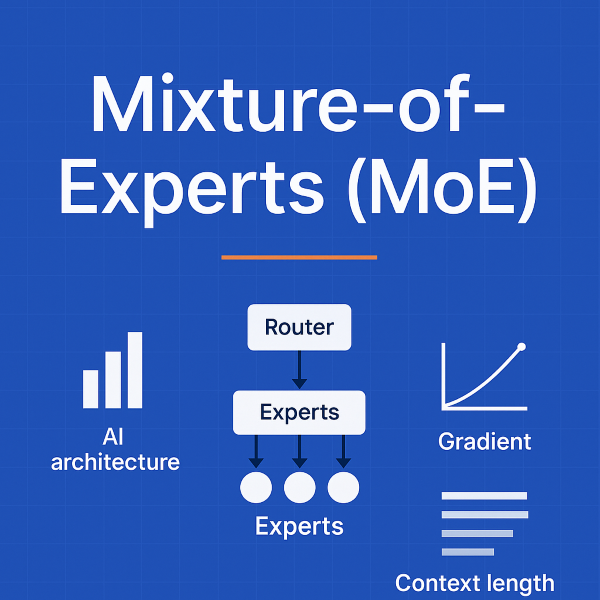
  • Mixture-of-Experts (MoE) Explained: How Trillion-Parameter AI Models Actually Work

    Mixture-of-Experts (MoE) Explained: How Trillion-Parameter AI Models Actually Work

    Decoding AI Models: My Journey from Jargon to Clarity

    The other evening, I was casually browsing OpenRouter, a platform that lets you explore and compare different AI models. I wasn’t looking for anything in particular, just curious about how the newer models stacked up against the usual suspects like GPT-4 or Claude.

    And then, I stumbled upon this summary 👇

    At first glance, it looked impressive — big numbers, fancy names, and technical terms. But let’s be honest: unless you live and breathe AI research, it reads like another alphabet soup.

    So, I decided to slow down. What do these words actually mean? And why should they matter to us — whether we’re building, leading, or just trying to understand the AI shift?


    Context Length: The Model’s Memory

    One of the first things that stood out was context length. In simple terms, it’s how much text a model can “see” at once.

    • A smaller model might only remember a few pages of conversation.
    • The bigger ones, like Grok 4 Fast, can handle 2 million tokens — that’s like feeding an entire bookshelf of books and still getting a coherent answer back.

    Think of it as working memory for AI. Short memory means fragmented thoughts. Long memory means deep analysis across huge documents, codebases, or conversations.


    Mixture-of-Experts (MoE): Not Every Brain Cell at Once

    Then came the phrase: 1T parameters with 32B active per forward pass.

    Here’s the trick: not all of those trillion parameters are working every time. That’s the beauty of Mixture-of-Experts (MoE).

    Instead of a model where every neuron fires for every input (dense models), MoE routes your query to just a few specialized experts:

    • Ask for math? It finds the math expert.
    • Need code? It calls in the coding expert.
    • Want natural language? Another expert takes over.

    This way, the model has massive capacity but only spends energy where it matters.


    Gradients & Routing: The Hidden Plumbing

    As I dug deeper, I realized training these models is not just about scale — it’s about stability.

    • Gradient: Think of it as the GPS signal that tells the model how to improve. Too weak, and the model doesn’t learn. Too strong, and it crashes.
    • Routing: Imagine an air traffic controller deciding which “expert runway” each input should land on. Balanced routing means experts stay healthy; unbalanced routing means some get lazy, others burn out.

    This is why new optimizers like MuonClip exist — they keep trillion-parameter models from collapsing under their own weight.


    Quantization: The Art of Compression

    Another technical term: fp8 quantization.

    Instead of using heavy 32-bit numbers for everything, models store weights in 8-bit floating-point format. Think of it as compressing photos on your phone — smaller size, faster load, almost no visible difference. For trillion-parameter models, this is the difference between “runs in theory” and “runs in reality.”


    The Business Side: Pricing in Tokens

    Finally, the pricing model clicked.

    Most APIs don’t charge for time — they charge by tokens. And they split it into two sides:

    • Input tokens (your prompt).
    • Output tokens (the model’s reply).

    For example, Kimi K2 costs $0.38 per million input tokens and $1.52 per million output tokens. So, pasting in a 500-page PDF and getting back a 2,000-word summary might cost just a few cents.


    The Takeaway

    As I pieced it all together, one thing became clear:
    These models aren’t just growing bigger. They’re growing smarter.

    • MoE gives us scale without waste.
    • Gradients and routing keep the training balanced.
    • Quantization makes it practical.
    • Context length opens up whole new use cases.

    The hype isn’t in the jargon. The magic is in the architecture.


    The Open Question

    So here’s what I’m left wondering — and maybe you are too:

    👉 Will Mixture-of-Experts become the standard blueprint for future AI?
    Or will dense + retrieval hybrids (like retrieval-augmented generation, RAG) still dominate?

    Because if history is any guide, the answer won’t just shape AI research. It’ll shape how we all interact with intelligence itself.


    ✍️ What do you think?

    Reply in comments

    #AI #LLM #MachineLearning #FutureOfAI #OpenRouter

  • Super AI Ops

    AI-Powered Solutions for MSPs: Hackathon Innovation Guide

    AI-Powered
    Solutions for MSPs

    Transforming managed services through strategic AI innovation—from immediate automation to future-forward autonomous systems

    Amazon Bedrock Generative AI Strategic Innovation

    Immediate Impact

    Practical AI solutions ready for implementation today

    Future Vision

    Autonomous agents and predictive systems for tomorrow

    Executive Summary

    For your hackathon submission, you can develop a range of AI-powered solutions for MSPs using the Amazon tech stack. This comprehensive guide outlines both immediate-use solutions and future-forward concepts across four critical themes.

    Immediate Solutions

    • AIOps pipeline with Amazon Bedrock
    • Collaborative AI knowledge base with Amazon Kendra
    • AI-driven client proposal generator with ChatGPT
    • ChatGPT-powered ticketing system

    Future Concepts

    • Autonomous IT agents with Amazon Bedrock AgentCore
    • Agentic AI community hub
    • AI-optimized financial forecasting system
    • Hyper-personalized AI assistants

    This strategic framework provides a roadmap for innovation in IT Operations, Open Innovation, Growth and Financial Improvement, and IT Service Delivery—leveraging AWS's comprehensive AI tech stack including Amazon Bedrock, Gemini, and ChatGPT capabilities.

    IT Operations

    Transforming operational efficiency through intelligent automation and predictive analytics

    Immediate Use: AIOps Pipeline with Amazon Bedrock

    The immediate application of an AIOps pipeline, powered by Amazon Bedrock, presents a transformative opportunity for MSPs to enhance operational efficiency, reduce manual intervention, and improve the reliability of IT infrastructures. This solution leverages generative AI to automate and optimize key operational tasks, moving beyond traditional reactive support models.

    Real-time System Monitoring

    Integrate Amazon Bedrock with CloudWatch and Lambda for continuous log ingestion and intelligent analysis, identifying anomalies and patterns missed by traditional monitoring systems.

    Automated Incident Response

    Leverage AWS Step Functions to orchestrate automated remediation workflows, from service restarts to resource scaling, reducing manual intervention.

    Predictive Analytics

    Analyze historical data to predict future failures, enabling proactive maintenance and moving from reactive "break-fix" to preventive care.

    AI operations center dashboard

    "This approach aligns with the broader industry trend of adopting AI to manage the increasing complexity of modern IT systems, where manual monitoring and troubleshooting are no longer scalable or effective."

    Future Concept: Autonomous IT Agents with Amazon Bedrock AgentCore

    The future of IT operations lies in autonomous IT agents, powered by Amazon Bedrock AgentCore. These agents represent a leap toward self-healing infrastructure, capable of understanding underlying causes, learning from experiences, and continuously improving performance.

    Self-Healing Infrastructure

    Continuous monitoring and proactive issue resolution without human intervention

    Proactive Detection

    Advanced diagnosis and root cause analysis before issues impact users

    Fully Automated Workflows

    End-to-end service lifecycle management from provisioning to decommissioning

    Autonomous AI agents operating in a data center environment

    This concept represents a paradigm shift from automated workflows to truly autonomous IT management, enabling MSPs to deliver unprecedented service levels.

    Open Innovation

    Breaking down knowledge silos and fostering collaborative innovation across the MSP ecosystem

    Immediate Use: Collaborative AI Knowledge Base with Amazon Kendra

    Address knowledge silos by building a shared knowledge repository using Amazon Kendra. This intelligent search service powered by machine learning creates a highly accurate enterprise search solution that breaks down information barriers.

    Shared Knowledge Repository

    Centralized repository built with Amazon S3, DynamoDB, and CloudFront for storing technical documentation, best practices, and client-specific information.

    Amazon S3 DynamoDB CloudFront

    Intelligent Search & Problem-Solving

    Natural language search capabilities with Amazon Comprehend and Translate integration for multilingual support and enhanced accuracy.

    Key Benefits

    • Reduced time to find critical information
    • Improved service delivery quality
    • Faster employee onboarding
    • Enhanced knowledge reuse and sharing

    Future Concept: Agentic AI Community Hub

    AI community hub concept

    The next evolution of Open Innovation is an Agentic AI Community Hub—a collaborative platform where MSPs share knowledge, tools, and best practices for implementing AI in IT operations. This hub creates a vibrant ecosystem for co-developing AI solutions.

    Collaborative Development

    Shared development environment with pre-trained models and APIs

    Agent Marketplace

    Platform for sharing and monetizing AI agents and tools

    Ecosystem Innovation

    Fostering innovation across the entire MSP community

    Growth and Financial Improvement

    Driving business growth through AI-powered automation and strategic financial optimization

    Immediate Use: AI-Driven Client Proposals with ChatGPT via Amazon Bedrock

    Leverage ChatGPT through Amazon Bedrock to automate and enhance the entire proposal development lifecycle. This solution streamlines core proposal documents, marketing materials, service descriptions, and sophisticated financial models. [166]

    Automated Personalization

    Transform basic client information into comprehensive, tailored proposals with industry-specific compliance considerations like HIPAA and PCI DSS.

    CRM Integration

    Seamless integration with HubSpot or Salesforce for automated proposal generation from existing client data. [166]

    AI generating business proposal documents

    Marketing Automation

    Generate detailed service descriptions, case studies, and supporting collateral with consistent messaging and branding. [166]

    ROI Calculator and Financial Forecasts

    Automate development of sophisticated ROI calculators that consider implementation costs, operational savings, productivity gains, and risk mitigation benefits. [166]

    Cost Analysis

    Savings Projection

    Risk Mitigation

    Future Concept: AI-Optimized Financial Forecasting

    Evolve from static proposals to dynamic, continuous financial optimization. This comprehensive platform leverages advanced AI models to analyze vast amounts of data, predict future trends, and provide actionable insights for maximizing revenue and profitability.

    Client Usage Pattern Analysis

    Deep analysis of client usage patterns and true service delivery costs, identifying opportunities for upselling, cross-selling, and pricing optimization.

    Predictive Financial Modeling

    Forecast future revenue, predict client churn, and simulate financial impact of strategic decisions using advanced machine learning models.

    Dynamic Pricing Optimization

    Implement flexible, data-driven pricing that adjusts based on client usage, market demand, and competitor pricing to maximize revenue.

    AI-powered financial forecasting system interface

    Integration Points

    • PSA Tools
    • RMM Platforms
    • Accounting Software
    • Market Data Sources

    Strategic Transformation

    Transform financial management from reactive analysis to proactive strategic planning, enabling data-driven decisions that drive sustainable growth and competitive advantage.

    IT Service Delivery

    Enhancing service quality and efficiency through intelligent automation and personalized support experiences

    Immediate Use: ChatGPT-Powered Ticketing System

    Implement a ChatGPT-powered ticketing system to improve service delivery efficiency. This solution automates ticket classification, provides intelligent suggestions, and enhances SLA monitoring through AI-driven insights.

    Automated Classification & Routing

    AI automatically analyzes ticket content, classifies by category and priority, and routes to appropriate support teams.

    Intelligent Suggestions

    Provides suggested solutions and knowledge base references to users and agents for faster resolution.

    SLA Monitoring

    Automatic tracking and reporting of SLA performance with trend analysis and breach identification.

    AI-powered ticketing system interface

    System Benefits

    ↑ 40%

    Efficiency Increase

    ↓ 60%

    Resolution Time

    ↑ 95%

    SLA Compliance

    ↓ 30%

    Support Costs

    Future Concept: Hyper-Personalized AI Assistants

    Personalized AI assistant helping a user with their computer

    The future of IT service delivery lies in hyper-personalized AI assistants—intelligent digital companions that provide truly personalized and proactive support experiences. These assistants go beyond traditional chatbots, understanding unique user needs, preferences, and behaviors.

    AI-Powered Digital Assistants

    Personalized support understanding user role, location, and device context

    Personalized Experiences

    Learning from past interactions and anticipating future needs with emotional intelligence

    Predictive Support

    Identifying potential issues before they occur based on user behavior analysis

    Ultimate Goal: Proactive User Empowerment

    Transform IT support from reactive problem-solving to proactive user empowerment, enhancing productivity and security while reducing support requests through intelligent anticipation and guidance.

    Implementation Roadmap

    Strategic approach to deploying AI solutions for MSPs

    1

    Foundation Phase

    • • AIOps Pipeline Setup
    • • ChatGPT Ticketing
    • • Basic Monitoring
    2

    Enhancement Phase

    • • AI Proposal Generator
    • • Kendra Knowledge Base
    • • Automated Responses
    3

    Optimization Phase

    • • Financial Forecasting
    • • Predictive Analytics
    • • Dynamic Pricing
    4

    Innovation Phase

    • • Autonomous Agents
    • • AI Community Hub
    • • Personalized Assistants

    Ready to Transform Your MSP?

    These AI-powered solutions represent the future of managed services. Start with immediate-impact implementations and build toward autonomous, intelligent operations.

    Amazon Bedrock ChatGPT AWS Services Innovation Ready

  • Open-Source Technologies, AI, and Cloud Computing

    Open-Source Technologies, AI, and Cloud Computing

    Open-source software is contributing to the development of responsible AI. Transparency is key to building trust in AI systems, and this is where open-source software shines. Users can carefully examine the underlying mechanisms of open-source software, which reduces the risk of unintended consequences and encourages the responsible development of AI.

    The open-source community, built on trust, is well-suited to guide AI’s advancement. It can create the necessary guardrails to ensure AI is safe, secure, and successful by applying past open-source principles to future technologies.

    Open-source software democratizes AI, making it more accessible. Many of the most advanced AI algorithms reside within the open-source space, with free libraries and tools available to improve coding efficiency.

    Cloud computing is essential for AI development and deployment due to its processing power. AI applications often perform best on servers with multiple high-speed GPUs, but the cost of these systems can be prohibitive for many organisations. Cloud computing offers AI as a service, providing a more cost-effective alternative.

    Cloud platforms are the primary distribution mechanism for AI algorithms. They provide the infrastructure and services necessary to train, deploy, and scale AI models, making AI more accessible and usable.

    AI is transforming cloud computing by making it smarter, faster, and more secure. For example, AI automates repetitive tasks in cloud systems, like managing storage and computing power, allowing for smooth operations without constant human intervention. AI also enhances cloud security by identifying unusual activity in real time, such as flagging access attempts from unfamiliar locations.

    • AI in cloud computing offers several advantages for businesses:
      • Value for money: Companies can save money by avoiding large capital expenditures on specialized hardware and infrastructure.
      • Enhanced performance: Cloud-based AI platforms provide access to modern infrastructure and the latest AI technologies, enabling businesses to enhance application performance and leverage advanced analytics capabilities.
      • Improved security: AI strengthens security by proactively identifying and mitigating threats in real time.
      • Access to modern infrastructure: AI cloud computing makes high-performance infrastructure, such as servers with multiple high-speed GPUs, accessible to organisations that might not otherwise be able to afford it.

    The convergence of AI and cloud computing is driving innovation across industries. For example, AI-powered chatbots provide real-time customer support, and AI-driven business intelligence applications gather data on markets, target audiences, and competitors. The combination of cloud and AI is also driving innovation in areas like the Internet of Things (IoT), where AI enables IoT devices to learn from data and improve over time.

    Open-source technologies play a crucial role in cloud optimization, offering flexible and customizable solutions. Unlike proprietary software, open-source solutions can be adapted to an organisation’s specific needs, whether it’s improving performance, resource allocation, or security. Open-source also promotes interoperability and compatibility, which is critical for managing diverse cloud platforms in multi-cloud or hybrid cloud environments. The large and active communities supporting open-source projects provide continuous support, share best practices, and ensure solutions remain updated.

    Select open-source technologies like Kubernetes and OpenStack are central to cloud optimization. Kubernetes simplifies application deployment and management, while OpenStack provides a scalable platform for building private and public clouds. Other open-source tools like Docker, Ansible, Terraform, and Prometheus also contribute to cloud optimization by enabling application containerization, infrastructure automation, and performance monitoring.

    Highlighting the significant role of open-source technologies in driving innovation in AI and cloud computing.

    • Open-source software fosters a collaborative and transparent environment where developers worldwide contribute their expertise to solve complex problems. More advanced technologies are easily accessible for riving innovation at all levels in collaborating with Open source technology.
    • Kubernetes is a fine example of the impact of open-source in cloud computing. As a container orchestration platform, it simplifies the deployment, scaling, and management of applications in the cloud. By using Kubernetes, organizations can optimise resource allocation, improve application availability, and achieve efficient workload distribution. This makes it a critical tool for managing the complex demands of AI workloads, which often require significant computing resources.
    • Cloud providers, including Microsoft and Amazon Web Services (AWS), have embraced open-source solutions like Red Hat OpenShift for containerisation software. This clearly states the growing recognition of the value and importance of open-source in the cloud computing landscape.
    • Furthermore, open-source is also instrumental in democratising AI, by providing access to advanced algorithms and tools, such as generative AI tools that can simplify code writing. This allow smaller organisations and individual developers to easily access the resources without any investment in proprietary AI solutions.

    Open source is not just an innovator, it is also going to help enterprises build trust to consume AI in the future.

    • Democratizing AI. Open source is making AI more accessible by making advanced algorithms, free libraries, and tools available. The low cost and flexibility of open source software encourages innovation and makes AI development more inclusive by allowing developers and organizations with limited resources to use state-of-the-art algorithms without substantial investment.
    • Building trust and transparency in AI. The collaborative and community-based nature of open source software, built on trust, can help address concerns about AI development and create necessary guardrails to make AI safe, secure, and successful. Open source fosters trust and accountability because the entire codebase is available for anyone to inspect.
    • Improving AI code. Open source allows developers to contribute to emerging AI technologies and improve productivity by working together in a structured, programmatic way. Open source projects benefit from having a large number of developers with diverse skill sets and experiences from various backgrounds who can review the code and provide updates, suggest improvements, and fix bugs.
    • Enabling new capabilities in automation. Businesses are combining open source software with AI to automate processes, making them more efficient, effective, secure, and resilient. This intelligent automation also enables them to monitor systems, identify problems, and correct errors.

    Open source in AI development is not just about accessibility, it is also about governance. Regulated industries, in particular, must be able to audit their next-generation AI capabilities. One example of how open source and AI are being used to address real-world challenges is OS-Climate (OS-C), an open source community focused on building a data and software platform to boost the flow of global capital into climate change mitigation and resilience.

  • How AI is Transforming Cloud Computing

    How AI is Transforming Cloud Computing

    In today’s world where computers can think and learn just like us, and even faster! That’s how Artificial Intelligence (AI) is shaping computing and our lives. Imagine a giant digital storage where we can keep all our important information safe and sound, like an online treasure chest in the cloud! 

    And as we combine AI with the cloud, amazing things begin to happen.

    A Perfect Partnership

    AI and cloud computing are two powerful technical innovations which are transforming the way businesses operate. Independently, they are already making waves, but together they create a synergy that’s driving innovation, efficiency, and new strategies. Just like peanut butter and jelly, or cookies and milk, AI and cloud computing complement each other perfectly!

    AI Makes the Cloud Smarter

    Think of it like teaching the cloud to think for itself. AI can automate many tasks in cloud data centres, making them run more smoothly and efficiently. For example:

    • Automating tasks: AI can automatically manage things like security, storage space, and even fix problems before they happen! This frees up IT professionals to focus on more creative and strategic work.
    • Analysing data: AI can analyse massive amounts of data in the cloud to find hidden patterns and insights helping businesses make better decisions, understand their customers better, and even predict future trends!
    • Personalising experiences: AI can personalise user experiences in the cloud, like recommending products or services based on your preferences making the cloud feel more as a helpful assistant than just a storage space.

    AI Makes the Cloud Super Speedy

    Just like a calculator can solve math problems in a blink, AI processes information at lightning speed. This means your favourite apps and websites load faster, videos stream without any annoying pauses, and businesses can analyse mountains of data in seconds.

    • Data Processing: AI acts like a super-powered brain, crunching through enormous amounts of data in the blink of an eye. This is super important for companies that rely on the cloud to store and process tons of information.
    • Application Performance: Remember that super-smart robot? AI learns how people use apps and services and then makes them run faster and smoother, like a well-oiled machine.
    • Reducing Latency: Imagine you’re playing a game online, and there’s a delay between your actions and what you see on the screen. That’s called latency. AI helps to zap those delays away, so everything feels instant and responsive.

    AI Makes Cloud a Security Superhero

    Security is a big deal when we store important information online. That’s where AI swoops in with its superhero cape! It acts like a vigilant guardian, protecting cloud systems from any dangers.

    • Threat Detection: AI can spot anything suspicious happening in the cloud, like someone trying to log in from a weird location. It’s like having a super-sleuth on the case, always watching out for trouble.
    • Predicting Security Breaches: AI can predict potential security problems before they even happen! It’s like having a crystal ball that helps cloud systems prepare for any attacks.
    • Automated Response: If there is a threat, AI can jump into action and stop it right away, without needing a human to push any buttons. It’s like having a super-fast reflex, ready to defend the cloud at a moment’s notice.

    AI is Making the Cloud an Energy Saver

    We all know it’s important to save energy and be kind to our planet. AI is helping the cloud become more eco-friendly by reducing its energy usage.

    • Smart Resource Management: AI keeps an eye on everything happening in the cloud and makes sure that resources like servers are only used when needed. It’s like turning off the lights when you leave a room, preventing any energy waste.
    • Sustainability: AI helps cloud providers decrease their carbon footprint. This makes cloud computing a more sustainable and environmentally friendly option.

    Future of AI and Cloud Computing

    The future of AI and cloud computing is bright! As these technologies continue to evolve, they will become even more intertwined and powerful. Experts predict that AI will play a central role in cloud management, making it more automated, efficient, and secure.

    We can expect to see:

    • Cognitive Clouds: These next-generation cloud platforms will go beyond data storage and processing, showcasing the ability to understand and respond to information. Imagine a cloud that can learn from your interactions and anticipate your needs!
    • Seamless Predictive Analytics: AI will be able to predict future trends and outcomes with incredible accuracy, helping businesses stay ahead of the curve.
    • Democratization of AI: AI will become more accessible to businesses of all sizes, making it easier for them to innovate and compete.

    The combination of AI and cloud computing is opening up exciting new possibilities for businesses and individuals alike. It’s a truly transformative force that will continue to shape the world for years to come.

    More Exciting Things to Come!

    The partnership between AI and cloud computing is just getting started! As AI gets even smarter, we can expect amazing things to happen.

    Here’s a sneak peek into the future:

    • Even Smarter Customer Service: Imagine talking to a chatbot that can understand your questions perfectly and give you the exact help you need, instantly! AI is making cloud-based customer service incredibly helpful and efficient.
    • Super-Autonomous Cloud Systems: AI is making cloud systems so smart that they can almost run themselves! They’ll be able to handle tasks and fix problems on their own, requiring less human intervention. This will free up IT staff to focus on other, more creative tasks.

    Brand New Technologies: AI is powering incredible new technologies that we can only dream of today. These technologies will be able to learn from users and continuously improve, making our lives easier and more exciting.

    Real-World Examples of AI in the Cloud

    AI is already being used in many cloud-based applications, such as:

    • Digital Assistants: Think of Siri, Alexa, and Google Home. These smart assistants use AI to understand your commands and help you with everyday tasks.
    • Chatbots: Many companies use AI-powered chatbots to provide customer support, answer questions, and even make sales. These chatbots are getting smarter all the time, and they can often handle complex conversations just like a human.
    • Business Intelligence: Companies use AI in the cloud to analyse market trends, understand their customers better, and make smarter business decisions.

    Benefits for Businesses

    Using AI in the cloud offers many benefits for businesses, including:

    • Cost Savings: AI can automate tasks and make cloud infrastructure more efficient, which helps businesses save money.
    • Increased Productivity: AI can handle repetitive tasks, freeing up employees to focus on more strategic and creative work. This boosts overall productivity.
    • Improved Decision-Making: AI can analyse data to provide insights that help businesses make better decisions.
    • Enhanced Security: AI can help detect and prevent cyberattacks in the cloud, making data more secure.
    • Better Customer Experiences: AI can personalise customer experiences, making interactions with businesses more enjoyable and efficient.