Navigating the Linux Lifecycle: A Practical Field-Guide for IT & Governance Teams
TL;DR: Understand what “support” really means, how Red Hat, SUSE & Canonical treat EOSL, and what happens if you decide to go fully open-source. Includes timelines, decision matrix, and a free infographic prompt.
1. Why Support Lifecycles Matter
Every day a server sits past its End of Support Life (EOSL) it becomes a zero-day waiting to happen. For teams that decomm servers quarterly—and for governance leaders chasing evergreen estates—knowing exactly when patches stop is non-negotiable.
3. Red Hat Enterprise Linux (RHEL) in Plain English
RHEL Version
Full Support Ends
Maintenance Ends
ELS Add-on Until
RHEL 7
Aug 2019
Jun 2024
Jun 2028
RHEL 8
May 2024
May 2029
May 2032
RHEL 9
May 2027
May 2032
May 2035
EUS = stay on a minor release 24 extra months; ELS = keep the whole major release alive 4 extra years.
4. How SUSE & Canonical Compare
Vendor
Standard Life
Cheapest Extension
Party Trick
SUSE
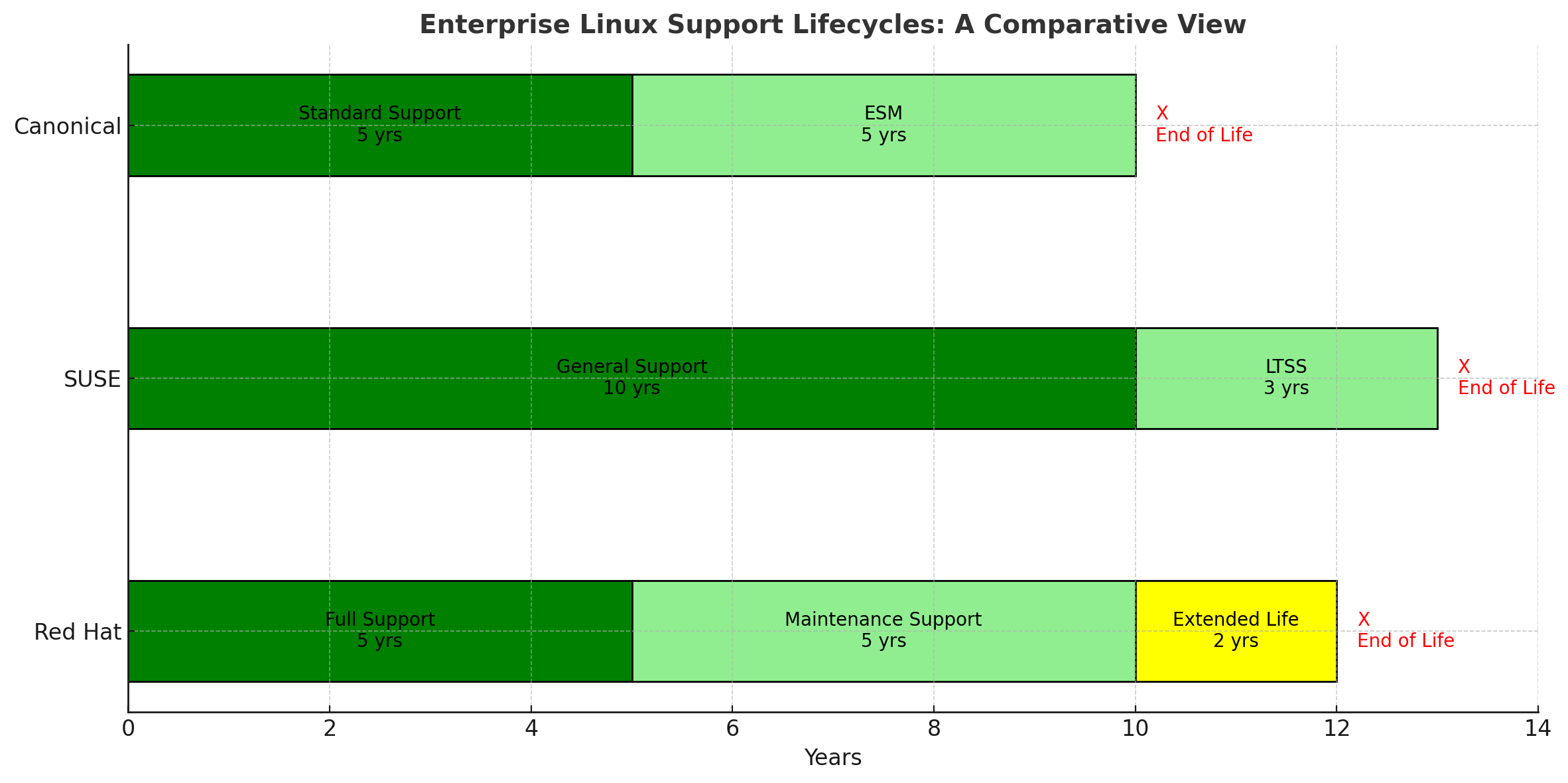
13 yrs
LTSS (+3 yrs)
ESPOS for SAP (3.5 yr overlap)
Canonical
5 yrs
Ubuntu Pro ESM (+5 yrs)
Free for 5×5 servers
5. The Open-Source Escape Hatch
Skipping enterprise subscriptions saves cash but transfers risk to you. Expect:
Community patches (no SLA)
DIY root-cause analysis with perf, systemtap, crash-dumps
Third-party lifelines: TuxCare, OpenLogic, Freexian (paid, still cheaper)
Build your own patch pipeline—Ansible, Katello, or plain dnf-automatic—and create a written decomm policy for unpatchable boxes.
6. Quick-Choice Matrix
Scenario
Recommended Path
Regulated / SAP
RHEL or SLES with ELS/LTSS
Cloud-native CI/CD
Ubuntu Pro LTS
Cost-constrained & skilled
AlmaLinux/Rocky + in-house SOC
7. Generate Your Own Infographic
Copy-paste this prompt into DALL·E, Midjourney or ChatGPT image:
“Flat-design infographic titled ‘Enterprise Linux Support Lifecycles’. Three horizontal timelines: RHEL 10-year bar (5 yr green Full, 5 yr light-green Maintenance, yellow Extended), SLES 13-year bar (10 yr green General, 3 yr LTSS), Ubuntu 10-year bar (5 yr green Standard, 5 yr ESM). End each bar with a red X and ‘EOSL’. Clean white background, modern tech palette, legible fonts.”
8. Next Steps for Governance Teams
Export your CMDB & colour-code by EOSL quarter.
Block calendar time 18 months before each red row.
Run a 6-month pilot on your short-list distribution before the clock hits zero.
🛡️ Stay evergreen—subscribe below for quarterly EOSL cheat-sheets.
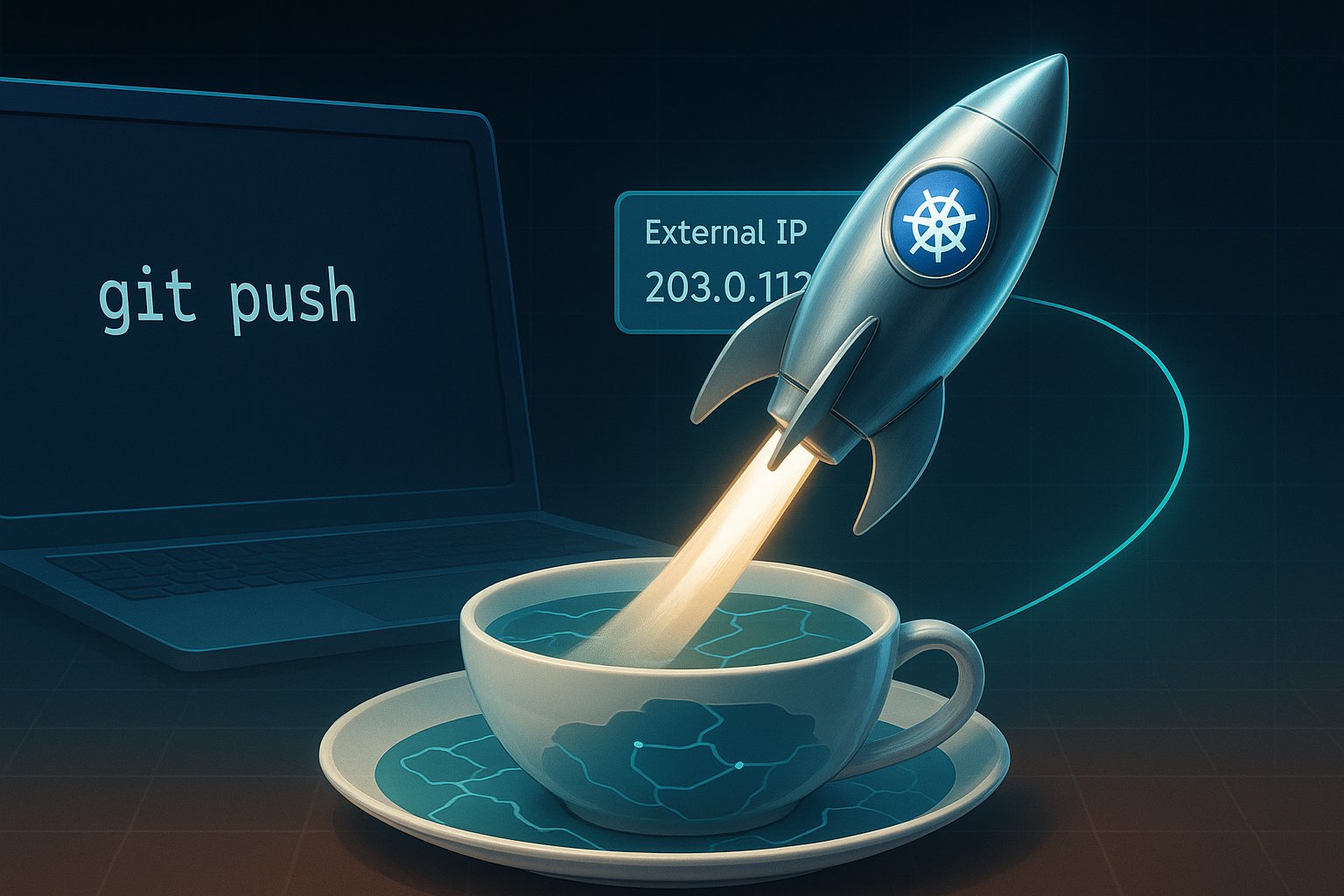
Picture yourself as the CTO of a seed-stage startup on a Tuesday afternoon. An investor just pinged you: “Can we see the live MVP by Thursday?” Your code works on your laptop, but the world still thinks your product is vaporware.
You need a runway, not a runway meeting.
You need Google Kubernetes Engine—the hyperscaler’s equivalent of a fully-staffed launchpad that charges you only for the rocket fuel you actually burn.
Today I’ll walk the tightrope between tutorial and treatise, turning the official GKE quickstart into a strategic story you can narrate to your board, your devs, or your future self at 2 a.m. when the pager goes off.
Grab your coffee; we’re going from git clone to “Hello, World!” on a public IP in under thirty billable minutes—and we’ll leave the meter running just low enough that your finance lead doesn’t flinch.
Act I: The Mythical One-Click Infra (Spoiler—There Are Six Clicks)
The fairy-tale version says, “Kubernetes is too complex.” The reality: GKE’s Autopilot mode abstracts away the yak shaving. Google runs the control plane, patches the OS, and even autoscaling is a polite request rather than a YAML epic. But before we taste that magic, we have to enable the spellbook.
Create or pick a GCP project—think of it as your private AWS account but with better coffee.
Enable the APIs:
Kubernetes Engine API
Artifact Registry API
Clickety-click in the console or one shell incantation:
Notice the tag: us-west1-docker.pkg.dev/your-project/hello-repo/hello-app:v1. That’s not vanity labeling; it’s the fully-qualified address where Artifact Registry will babysit your image.
At this point you have an immutable artifact. If prod breaks at 3 a.m., you can roll back to this exact SHA faster than your co-founder can send a panicked Slack emoji.
Act III: Birth of a Cluster—Autopilot vs. Standard Mode
Time for the strategic fork in the road.
Standard mode = you manage the nodes, the upgrades, the tears.
Autopilot mode = Google manages the nodes, you manage the profit margins.
Two minutes later, you have a Kubernetes API endpoint that fits in a tweet and a bill that starts at roughly $0.10/hour (plus the free-tier credit that erases the first $74.40 every month). If you’re running a single-zone staging cluster, that’s “free” in every language except accounting.
Act IV: Deploy, Expose, Brag
The kubectl ceremony is delightfully unceremonial.
GCP’s control plane now orchestrates a Layer-4 load balancer—yes, that shiny external IP you’ll text to your users.
Fetch the IP:
kubectl get service hello-app
Copy the EXTERNAL-IP, paste it into a browser, and watch the hostname change with every refresh. You have just built a globally reachable, autoscaled, self-healing web service while your espresso is still warm.
Act V: Budget, Burn Rate, and Boardroom Storytelling
Let’s translate the tachometer into English.
Cluster management fee: $0.10/hour (~$74/month without free tier).
Workload cost: Autopilot bills per pod resource requests. Our hello-app asks politely for 100 mCPU and 128 MiB RAM, so you’re looking at ~$3.50/month for three replicas in us-west1.
Load balancer: First forwarding rule is ~$18/month; subsequent rules share the cost.
Total runway for a three-pod MVP: under $25/month—cheaper than the SaaS subscription you’re probably expensing for CI/CD.
Act VI: Clean-Up or Level-Up
If this was just a rehearsal, tear it down:
kubectl delete service hello-app
gcloud container clusters delete hello-cluster --region=${REGION}
But if you’re shipping, keep the cluster and iterate:
Wire a custom domain via Cloud DNS and a global static IP.
Add a CI pipeline in Cloud Build that auto-pushes on every git push.
Swap the Service for an Ingress to get HTTP/2, SSL, and path-based routing without extra load balancers.
Curtain Call: The Meta-Narrative
Kubernetes used to be a rite of passage—an epic saga of YAML and tears. GKE’s Autopilot flips the script: infrastructure becomes a utility, like electricity or Wi-Fi. You still need to know Ohm’s Law, but you no longer need to string copper across the continent.
So, dear founder, the next time an investor asks, “Can we see it live by Thursday?” Smile, push your chair back, and say, “Give me thirty minutes and a fresh cup of coffee.”
Call to Action: Fork the hello-app repo, run the playbook above, and share your external IP—or your horror story—in the comments.
Need deeper cost modeling? Drop your pod specs and traffic estimates; I’ll run the numbers in the GKE Pricing Calculator and post a follow-up.
Imagine you’re standing on the tarmac. You see a massive cargo plane being loaded with thousands of packages. Each package is destined for a different corner of the world.
This is how Kubernetes works, a powerful open-source system for automating deployment, scaling, and management of containerized applications.
Think of Kubernetes as an air traffic control system. It orchestrates the movement of countless containers. These are standardized packages of software across a vast network of servers. But as the number of planes (applications) and destinations (clusters) grows, managing this intricate dance becomes increasingly complex.
This is where configuration management at scale comes into play. It’s like having a team of skilled logistics experts. They ensure that every package reaches its destination on time. Packages also arrive in perfect condition.
Let’s start our journey with DHL, a global logistics giant that knows a thing or two about managing complex operations. Their story begins in the early days of machine learning (ML). Back then, data scientists were like solo pilots. They relied on manual processes and “bash scripts” to get their models off the ground. These scripts were rudimentary instructions for computers.
This ad-hoc approach worked for small-scale experiments, but as DHL’s ML ambitions soared, they encountered turbulence. Reproducing results became a challenge, deployments were prone to instability, and limited resources hampered their progress.
They needed a more sophisticated system, an autopilot if you will, to navigate the complexities of ML at scale. Enter Kubeflow, an open-source platform designed specifically for ML workflows on Kubernetes.
Kubeflow brought much-needed structure and standardization to DHL’s ML operations. Data scientists could now access secure and isolated notebook servers. These are digital cockpits for developing and testing ML models. They could be accessed directly within the Kubeflow environment.
They could build robust pipelines, like automated flight paths, to train and deploy models. Kerve, a specialized framework, manages those mission-critical inference services. These are the components that make predictions based on trained models.
Kubeflow even empowered DHL to create “meta pipelines,” pipelines that orchestrate other pipelines.
Consider the air traffic control system. It can automatically adjust flight paths based on real-time conditions. This optimization ensures efficiency and safety. This hierarchical approach allowed DHL to tackle complex projects like product classification. Different pipelines handle specific aspects of sorting packages based on destination. Pipelines also manage sorting based on business unit and other factors.9
Just like an aircraft needs a skilled pilot to oversee the autopilot, Kubeflow requires dedicated expertise. This expertise is essential to maintain and operate effectively. DHL emphasized the need for a strong platform team. These are the behind-the-scenes engineers who ensure the system functions smoothly.
Kubeflow’s success at DHL highlights a crucial point: technology alone is not enough. It’s the people, their expertise, and their commitment to collaboration that truly make a difference.
Now, let’s shift our focus. We need to move from managing ML workflows to the challenge of building and deploying applications across diverse hardware platforms. Imagine you’re designing an aircraft that needs to operate in a variety of environments, from scorching deserts to freezing tundras. You’d need to carefully consider the materials, engines, and other components to ensure optimal performance under all conditions.
Similarly, in the world of software, different computing platforms use different processor architectures. Intel x86 dominates the server market, while ARM, known for its energy efficiency, powers many mobile devices and embedded systems. Building container images is a key challenge for modern application development. These images are standardized software packages. They can run seamlessly across diverse architectures.
This is where multi-architecture container images come into play. They’re like universal adapters, allowing you to plug your software into different platforms without modification.
One approach to building these universal images is using a tool called pack, part of the Cloud Native Buildpacks project. Consider pack an automated assembly line. It takes your source code and churns out container images tailored for different architectures.
Pack relies on OCI (Open Container Initiative) image indexes, those master blueprints that describe the available images for different architectures. It’s like having a catalogue that lists all the compatible parts for different aircraft models.
Pack’s magic lies in its ability to read configuration files that specify target architectures. It then automatically creates those image indexes. This process simplifies the task for developers.
This automation is crucial for organizations. They need to deploy applications across a wide range of hardware platforms. These platforms range from powerful servers in data centres to resource-constrained devices at the edge.
Speaking of the edge, let’s venture into the realm of airborne computing. Thales is a company that’s literally putting Kubernetes clusters on airplanes.
Imagine a data centre, not in some sprawling warehouse, but soaring through the skies at 35,000 feet. That’s the kind of innovation Thales is bringing to the world of edge computing. They’re enabling airlines to run containerized workloads. These self-contained applications operate directly on aircraft. This opens up a world of possibilities for in-flight entertainment, connectivity, and even real-time aircraft monitoring and maintenance.
Thales’ approach exemplifies the adaptability and resilience of Kubernetes. They’ve designed a system that can operate reliably in a highly constrained environment, with limited resources and intermittent connectivity.
Their onboard data centre, remarkably, consumes only 300 watts, less than a hairdryer! This incredible efficiency shows their engineering prowess. It also demonstrates the power of Kubernetes to run demanding workloads even on resource-constrained hardware.
Thales leverages GitOps principles, treating their infrastructure as code. They use Flux, a popular GitOps tool, to automate deployments and manage configurations. It’s like having an autopilot that constantly monitors and adjusts the system based on predefined instructions, ensuring stability and reliability.
They’ve built a clever system for OS updates. This system uses a layered approach. It minimizes downtime and ensures a smooth transition between versions. It’s like upgrading the software on an aircraft’s navigation system without ever having to ground the plane.
But managing Kubernetes at scale, even on the ground, presents unique challenges. Let’s turn our attention to Cisco, a networking giant with a vast network of data centres. Their story highlights the importance of blueprints. These are standardized deployment templates. Their story also emphasizes substitution variables. These are customizable parameters that allow you to tailor deployments for specific environments.
Imagine you’re building a fleet of aircraft. You’d start with blueprints that define the overall design. However, you’d need to adjust certain specifications based on the intended use. Examples include passenger capacity, range, or engine type.
Similarly, Cisco uses blueprints to define their standard Kubernetes deployments. They use substitution variables to configure applications differently for various data centres and clusters.
They initially relied heavily on Helm, a popular package manager for Kubernetes, to deploy their applications. Helm charts, those pre-packaged bundles of Kubernetes resources, became the building blocks of their deployments.
Their Kubernetes footprint expanded to hundreds of clusters. As a result, managing these Helm charts using YAML became a bottleneck. YAML is a ubiquitous yet often-maligned configuration language.
Imagine trying to coordinate the construction of hundreds of aircraft using only handwritten notes and spreadsheets. It’s a recipe for chaos and errors. YAML, with its lack of type safety and schema validation, proved inadequate for managing configurations at this scale.
Cisco’s engineers, like seasoned aircraft mechanics, built custom tools to validate their configurations and catch errors early on. But they knew that a more fundamental shift was needed. They yearned for a more robust and expressive language, something that could prevent configuration errors before they even took flight.
This is where CUE, a powerful configuration language, enters the picture. Imagine CUE as a sophisticated CAD software for Kubernetes configurations. It brings the rigor and precision of software engineering to the world of infrastructure management.
CUE enables type safety, ensuring that data types are consistent and preventing mismatches that could lead to errors. It also supports schema validation, allowing you to define strict rules for your configurations and catch violations early on.
Furthermore, CUE can directly import Kubernetes API specifications, those master blueprints for Kubernetes objects. This tight integration guarantees that your configurations are always valid and consistent with the latest Kubernetes standards.
To harness CUE’s power, a new tool called Timony has emerged. Timony, much like an expert aircraft assembler, uses CUE to generate intricate Kubernetes manifests. These manifests are the instructions that tell Kubernetes how to deploy and manage your applications.
Timony offers a level of abstraction and flexibility that goes beyond Helm. It allows you to define reusable modules. These modules are the building blocks of your configurations. You can combine them into complex deployments.
It also introduces the concept of “runtime.” This enables Timony to fetch configuration data directly from the Kubernetes cluster at deployment time. This removes the need to store sensitive information like secrets in your Git repositories. It enhances security and reduces the risk of accidental leaks.
The transition from Helm and YAML to CUE and Timony is a significant undertaking. It is like retraining an entire fleet of pilots on a new navigation system. But for organizations managing Kubernetes at scale, the potential benefits are enormous.
Imagine a world with less boilerplate code. Experience fewer configuration errors. Enjoy a smoother workflow for managing hundreds or even thousands of Kubernetes clusters. That’s the promise of CUE and Timony, and it’s a future worth striving for.
We are at the end of our journey through the Kubernetes skies. We have witnessed the remarkable evolution of tools and approaches for managing complex deployments. In the early days, there were bash scripts and manual processes. Now, we use sophisticated automation tools like Kubeflow, Flux, and Timony. The quest for efficiency, reliability, and scalability continues.
But the key takeaway is this: technology is only as good as the people who wield it. The expertise of data scientists, engineers, and platform teams truly unlocks the power of Kubernetes. Their dedication to collaboration and knowledge sharing is essential.
As you navigate your own Kubernetes journey, remember the lessons learned from DHL, Thales, and Cisco. Embrace the power of automation, but never underestimate the importance of human ingenuity and collaboration. Who knows? You could be the one to pilot the next groundbreaking innovation in the ever-evolving world of Kubernetes.
This leap shows DevOps’ role in bridging the development and operations gap. It streamlines workflows, improves product quality, and accelerates time-to-market.
With 2024 on the horizon, what’s next for DevOps? We’re seeing a shift in trends. The change is moving from AI-driven operations (AIOps) to refined DevSecOps practices. There is also an adoption of GitOps in infrastructure management.
Let’s explore the trends that will shape the DevOps landscape. We will highlight actionable insights, strategies, and ways to understand core concepts. These will help you stay at the forefront.
Key Trends in DevOps for 2024
1. AIOps: Harnessing AI and ML for Operational Excellence
AIOps, or AI-powered operations, is more than just an emerging buzzword. It’s an intelligent way of managing the sheer complexity of today’s distributed systems.
AIOps platforms utilize AI and machine learning. They can analyze vast quantities of log and monitoring data. This allows them to spot anomalies, predict system failures, and trigger automated responses. For example, if an e-commerce company sees an unexpected surge in traffic, AIOps can detect early signals of system strain. It can then allocate resources. This helps to mitigate performance drops before customers feel any impact.
If your team is new to AIOps, start by integrating AI capabilities into monitoring tools you already use. Look for platforms offering modular AIOps features, so you can adopt and scale as needed.
2. DevSecOps: Integrating Security Seamlessly into DevOps Pipelines
Security is a top priority, but traditional DevOps models often treat it as an afterthought. Enter DevSecOps—an approach that weaves security into every stage of the software development lifecycle.
In 2024, this integration is going deeper, with automated security checks, dynamic vulnerability scanning, and compliance monitoring at every deployment.
In a financial services company, as an example, to follow strict regulatory requirements. By adopting DevSecOps, this organization can automate compliance checks with each code commit. This approach reduces the risk of security breaches. It ensures compliance without slowing down release cycles.
Implementing DevSecOps effectively, by shifting security ‘left’—embedding security checks early in the CI/CD pipeline. Automate vulnerability scans in development to catch issues before they escalate.
3. GitOps: Revolutionizing Infrastructure Management through Version Control
GitOps leverages Git repositories as a source of truth for managing infrastructure. It brings a level of transparency and consistency. This approach is especially beneficial for teams with complex infrastructures.
With GitOps, every change in infrastructure configuration is tracked in Git. This tracking allows for easy rollbacks and collaborative workflows. It also minimizes configuration drift.
Imagine a retail business scaling its cloud environment to support seasonal traffic. By using GitOps, it can automate scaling policies and test changes in pre-production. The business can also revert configurations if needed. All of this is done while maintaining a single source of truth in Git.
Smaller teams can implement GitOps incrementally. Start by using Git for simpler configurations. Gradually extend it to more complex workflows as your team becomes more comfortable with the process.
4. Platform Engineering: Enabling Self-Service for DevOps Teams
Platform engineering teams focus on creating a self-service internal platform. This platform provides developers with tools, environments, and resources on demand. It reduces dependency on operations and fosters developer autonomy.
Platform engineering standardizes tools, permissions, and workflows. This enables organizations to sustain consistent environments. It also caters to individual developer needs.
A media streaming service looking to streamline its production pipeline can use platform engineering. It offers standard environments with built-in security and monitoring tools. This allows developers to focus on coding rather than configuration.
Find common bottlenecks in your team’s workflow. A platform engineering team can address these pain points by creating preconfigured environments for common tasks. This approach speeds up development cycles and reduces repetitive work.
Implementing Core DevOps Principles: Practical Applications for 2024
Automation in Action: Streamlining with CI/CD and Infrastructure as Code (IaC)
Automation remains a cornerstone of DevOps, and it’s more relevant than ever. Automation tools like CI/CD pipelines and Infrastructure as Code (IaC) simplify software delivery, eliminating manual errors and improving speed. CI/CD pipelines automate testing, building, and deployment, while IaC tools like Terraform allow teams to manage infrastructure configurations with code.
Start with lightweight CI/CD solutions like GitHub Actions. These tools are accessible and integrate easily with Git repositories, making automation feasible even for smaller DevOps teams.
Improving Developer Experience (DevEx): Key to Productive Teams
DevEx, or Developer Experience, is becoming a top priority for organizations embracing DevOps. Companies should provide the right tooling and streamlined processes. They should also support experimentation. These factors ensure developers work in environments that foster innovation and reduce burnout.
To enhance DevEx, focus on simplifying feedback loops. Make sure developers can access real-time metrics, error logs, and insights to minimize time spent troubleshooting and maximize coding time.
DevOps Beyond2024
DevOps is no longer a luxury; it’s a strategic necessity. As we approach 2024, trends like AIOps, DevSecOps, GitOps, and platform engineering aren’t just innovations. They are shaping the future of software development. Organizations that adapt to these shifts stand to gain a competitive edge in speed, security, and scalability.
How is your team preparing for the changes in DevOps this year? Share your thoughts, experiences, or insights in the comments below!
Open-source software is contributing to the development of responsible AI. Transparency is key to building trust in AI systems, and this is where open-source software shines. Users can carefully examine the underlying mechanisms of open-source software, which reduces the risk of unintended consequences and encourages the responsible development of AI.
The open-source community, built on trust, is well-suited to guide AI’s advancement. It can create the necessary guardrails to ensure AI is safe, secure, and successful by applying past open-source principles to future technologies.
Open-source software democratizes AI, making it more accessible. Many of the most advanced AI algorithms reside within the open-source space, with free libraries and tools available to improve coding efficiency.
Cloud computing is essential for AI development and deployment due to its processing power. AI applications often perform best on servers with multiple high-speed GPUs, but the cost of these systems can be prohibitive for many organisations. Cloud computing offers AI as a service, providing a more cost-effective alternative.
Cloud platforms are the primary distribution mechanism for AI algorithms. They provide the infrastructure and services necessary to train, deploy, and scale AI models, making AI more accessible and usable.
AI is transforming cloud computing by making it smarter, faster, and more secure. For example, AI automates repetitive tasks in cloud systems, like managing storage and computing power, allowing for smooth operations without constant human intervention. AI also enhances cloud security by identifying unusual activity in real time, such as flagging access attempts from unfamiliar locations.
AI in cloud computing offers several advantages for businesses:
Value for money: Companies can save money by avoiding large capital expenditures on specialized hardware and infrastructure.
Enhanced performance: Cloud-based AI platforms provide access to modern infrastructure and the latest AI technologies, enabling businesses to enhance application performance and leverage advanced analytics capabilities.
Improved security: AI strengthens security by proactively identifying and mitigating threats in real time.
Access to modern infrastructure: AI cloud computing makes high-performance infrastructure, such as servers with multiple high-speed GPUs, accessible to organisations that might not otherwise be able to afford it.
The convergence of AI and cloud computing is driving innovation across industries. For example, AI-powered chatbots provide real-time customer support, and AI-driven business intelligence applications gather data on markets, target audiences, and competitors. The combination of cloud and AI is also driving innovation in areas like the Internet of Things (IoT), where AI enables IoT devices to learn from data and improve over time.
Open-source technologies play a crucial role in cloud optimization, offering flexible and customizable solutions. Unlike proprietary software, open-source solutions can be adapted to an organisation’s specific needs, whether it’s improving performance, resource allocation, or security. Open-source also promotes interoperability and compatibility, which is critical for managing diverse cloud platforms in multi-cloud or hybrid cloud environments. The large and active communities supporting open-source projects provide continuous support, share best practices, and ensure solutions remain updated.
Select open-source technologies like Kubernetes and OpenStack are central to cloud optimization. Kubernetes simplifies application deployment and management, while OpenStack provides a scalable platform for building private and public clouds. Other open-source tools like Docker, Ansible, Terraform, and Prometheus also contribute to cloud optimization by enabling application containerization, infrastructure automation, and performance monitoring.
Highlighting the significant role of open-source technologies in driving innovation in AI and cloud computing.
Open-source software fosters a collaborative and transparent environment where developers worldwide contribute their expertise to solve complex problems. More advanced technologies are easily accessible for riving innovation at all levels in collaborating with Open source technology.
Kubernetes is a fine example of the impact of open-source in cloud computing. As a container orchestration platform, it simplifies the deployment, scaling, and management of applications in the cloud. By using Kubernetes, organizations can optimise resource allocation, improve application availability, and achieve efficient workload distribution. This makes it a critical tool for managing the complex demands of AI workloads, which often require significant computing resources.
Cloud providers, including Microsoft and Amazon Web Services (AWS), have embraced open-source solutions like Red Hat OpenShift for containerisation software. This clearly states the growing recognition of the value and importance of open-source in the cloud computing landscape.
Furthermore, open-source is also instrumental in democratising AI, by providing access to advanced algorithms and tools, such as generative AI tools that can simplify code writing. This allow smaller organisations and individual developers to easily access the resources without any investment in proprietary AI solutions.
Open source is not just an innovator, it is also going to help enterprises build trust to consume AI in the future.
Democratizing AI. Open source is making AI more accessible by making advanced algorithms, free libraries, and tools available. The low cost and flexibility of open source software encourages innovation and makes AI development more inclusive by allowing developers and organizations with limited resources to use state-of-the-art algorithms without substantial investment.
Building trust and transparency in AI. The collaborative and community-based nature of open source software, built on trust, can help address concerns about AI development and create necessary guardrails to make AI safe, secure, and successful. Open source fosters trust and accountability because the entire codebase is available for anyone to inspect.
Improving AI code. Open source allows developers to contribute to emerging AI technologies and improve productivity by working together in a structured, programmatic way. Open source projects benefit from having a large number of developers with diverse skill sets and experiences from various backgrounds who can review the code and provide updates, suggest improvements, and fix bugs.
Enabling new capabilities in automation. Businesses are combining open source software with AI to automate processes, making them more efficient, effective, secure, and resilient. This intelligent automation also enables them to monitor systems, identify problems, and correct errors.
Open source in AI development is not just about accessibility, it is also about governance. Regulated industries, in particular, must be able to audit their next-generation AI capabilities. One example of how open source and AI are being used to address real-world challenges is OS-Climate (OS-C), an open source community focused on building a data and software platform to boost the flow of global capital into climate change mitigation and resilience.
In today’s world where computers can think and learn just like us, and even faster! That’s how Artificial Intelligence (AI) is shaping computing and our lives. Imagine a giant digital storage where we can keep all our important information safe and sound, like an online treasure chest in the cloud!
And as we combine AI with the cloud, amazing things begin to happen.
A Perfect Partnership
AI and cloud computing are two powerful technical innovations which are transforming the way businesses operate. Independently, they are already making waves, but together they create a synergy that’s driving innovation, efficiency, and new strategies. Just like peanut butter and jelly, or cookies and milk, AI and cloud computing complement each other perfectly!
AI Makes the Cloud Smarter
Think of it like teaching the cloud to think for itself. AI can automate many tasks in cloud data centres, making them run more smoothly and efficiently. For example:
Automating tasks: AI can automatically manage things like security, storage space, and even fix problems before they happen! This frees up IT professionals to focus on more creative and strategic work.
Analysing data: AI can analyse massive amounts of data in the cloud to find hidden patterns and insights helping businesses make better decisions, understand their customers better, and even predict future trends!
Personalising experiences: AI can personalise user experiences in the cloud, like recommending products or services based on your preferences making the cloud feel more as a helpful assistant than just a storage space.
AI Makes the Cloud Super Speedy
Just like a calculator can solve math problems in a blink, AI processes information at lightning speed. This means your favourite apps and websites load faster, videos stream without any annoying pauses, and businesses can analyse mountains of data in seconds.
Data Processing: AI acts like a super-powered brain, crunching through enormous amounts of data in the blink of an eye. This is super important for companies that rely on the cloud to store and process tons of information.
Application Performance: Remember that super-smart robot? AI learns how people use apps and services and then makes them run faster and smoother, like a well-oiled machine.
Reducing Latency: Imagine you’re playing a game online, and there’s a delay between your actions and what you see on the screen. That’s called latency. AI helps to zap those delays away, so everything feels instant and responsive.
AI Makes Cloud a Security Superhero
Security is a big deal when we store important information online. That’s where AI swoops in with its superhero cape! It acts like a vigilant guardian, protecting cloud systems from any dangers.
Threat Detection: AI can spot anything suspicious happening in the cloud, like someone trying to log in from a weird location. It’s like having a super-sleuth on the case, always watching out for trouble.
Predicting Security Breaches: AI can predict potential security problems before they even happen! It’s like having a crystal ball that helps cloud systems prepare for any attacks.
Automated Response: If there is a threat, AI can jump into action and stop it right away, without needing a human to push any buttons. It’s like having a super-fast reflex, ready to defend the cloud at a moment’s notice.
AI is Making the Cloud an Energy Saver
We all know it’s important to save energy and be kind to our planet. AI is helping the cloud become more eco-friendly by reducing its energy usage.
Smart Resource Management: AI keeps an eye on everything happening in the cloud and makes sure that resources like servers are only used when needed. It’s like turning off the lights when you leave a room, preventing any energy waste.
Sustainability: AI helps cloud providers decrease their carbon footprint. This makes cloud computing a more sustainable and environmentally friendly option.
Future of AI and Cloud Computing
The future of AI and cloud computing is bright! As these technologies continue to evolve, they will become even more intertwined and powerful. Experts predict that AI will play a central role in cloud management, making it more automated, efficient, and secure.
We can expect to see:
Cognitive Clouds: These next-generation cloud platforms will go beyond data storage and processing, showcasing the ability to understand and respond to information. Imagine a cloud that can learn from your interactions and anticipate your needs!
Seamless Predictive Analytics: AI will be able to predict future trends and outcomes with incredible accuracy, helping businesses stay ahead of the curve.
Democratization of AI: AI will become more accessible to businesses of all sizes, making it easier for them to innovate and compete.
The combination of AI and cloud computing is opening up exciting new possibilities for businesses and individuals alike. It’s a truly transformative force that will continue to shape the world for years to come.
More Exciting Things to Come!
The partnership between AI and cloud computing is just getting started! As AI gets even smarter, we can expect amazing things to happen.
Here’s a sneak peek into the future:
Even Smarter Customer Service: Imagine talking to a chatbot that can understand your questions perfectly and give you the exact help you need, instantly! AI is making cloud-based customer service incredibly helpful and efficient.
Super-Autonomous Cloud Systems: AI is making cloud systems so smart that they can almost run themselves! They’ll be able to handle tasks and fix problems on their own, requiring less human intervention. This will free up IT staff to focus on other, more creative tasks.
Brand New Technologies: AI is powering incredible new technologies that we can only dream of today. These technologies will be able to learn from users and continuously improve, making our lives easier and more exciting.
Real-World Examples of AI in the Cloud
AI is already being used in many cloud-based applications, such as:
Digital Assistants: Think of Siri, Alexa, and Google Home. These smart assistants use AI to understand your commands and help you with everyday tasks.
Chatbots: Many companies use AI-powered chatbots to provide customer support, answer questions, and even make sales. These chatbots are getting smarter all the time, and they can often handle complex conversations just like a human.
Business Intelligence: Companies use AI in the cloud to analyse market trends, understand their customers better, and make smarter business decisions.
Benefits for Businesses
Using AI in the cloud offers many benefits for businesses, including:
Cost Savings: AI can automate tasks and make cloud infrastructure more efficient, which helps businesses save money.
Increased Productivity: AI can handle repetitive tasks, freeing up employees to focus on more strategic and creative work. This boosts overall productivity.
Improved Decision-Making: AI can analyse data to provide insights that help businesses make better decisions.
Enhanced Security: AI can help detect and prevent cyberattacks in the cloud, making data more secure.
Better Customer Experiences: AI can personalise customer experiences, making interactions with businesses more enjoyable and efficient.