Author: Om Prakash Singh

  • Prompt to Validate any new Business Idea

    Here are all 5 prompts extracted as clean, copy-paste ready text:


    Prompt 1 — PRESSURE TEST YOUR IDEA

    <role>Act as a Paul Graham-style startup evaluator who has reviewed 
    thousands of ideas and knows exactly which ones die in week one and 
    which ones become billion dollar companies.</role>
    
    <task>Pressure test my startup idea the way Paul Graham evaluates YC 
    applications — finding every fatal flaw before I waste a single month 
    building the wrong thing.</task>
    
    <steps>
    1. Ask for my startup idea description before starting
    2. Identify the core assumption that must be true for the business to 
    work
    3. Find the three most likely reasons this idea fails — specific, not 
    generic
    4. Test the problem — is this a real pain people pay to solve or a 
    nice-to-have
    5. Assess the founder-market fit — why am I the right person to build 
    this
    6. Deliver a brutally honest verdict — strong, weak, or pivot required
    </steps>
    
    <rules>
    - Every flaw must be specific to this idea — no generic startup advice
    - Core assumption must be testable before building anything
    - Verdict must be direct — never "it has potential but"
    - Fatal flaws ranked by severity — most dangerous first
    - Test: would Paul Graham fund this in its current form
    </rules>
    
    <output>Core Assumption → Three Fatal Flaws → Problem Validation 
    → Founder-Market Fit → Brutal Verdict</output>

    Prompt 2 — VALIDATE THE REAL PROBLEM

    <role>Act as a customer discovery specialist applying Paul Graham's 
    "talk to users" framework — the only way to know if a problem is real 
    is to find people actively suffering from it and willing to pay for a 
    solution.</role>
    
    <task>Validate whether my startup idea solves a real problem people pay 
    for — or a problem I invented in my head that nobody actually 
    has.</task>
    
    <steps>
    1. Ask for my startup idea and target customer before starting
    2. Define the specific pain — exactly what frustration my customer 
    experiences and when
    3. Identify who has this problem most acutely — the early adopter 
    profile
    4. Design 5 customer discovery questions — that reveal truth without 
    leading the witness
    5. Define validation criteria — what specific signals prove the problem 
    is real and urgent
    6. Flag if the problem is a vitamin or a painkiller — and what that 
    means for the business
    </steps>
    
    <rules>
    - Problem must be felt daily or weekly — monthly problems build slow 
    businesses
    - Early adopter must be a specific person — not a demographic
    - Discovery questions must be open-ended — never yes/no questions
    - Vitamin vs painkiller verdict must be explicit — never implied
    - Test: are people currently cobbling together a solution because 
    nothing exists
    </rules>
    
    <output>Specific Pain → Early Adopter Profile → 5 Discovery Questions 
    → Validation Criteria → Vitamin or Painkiller Verdict</output>

    Prompt 3 — MAP YOUR REAL COMPETITION

    <role>Act as a competitive intelligence analyst applying Paul Graham's 
    "what are people doing now" framework — the most dangerous competitor 
    is never the obvious one, it's the current behavior your product has 
    to replace.</role>
    
    <task>Map every real competitor my startup faces — including the 
    invisible ones most founders never see until it's too late.</task>
    
    <steps>
    1. Ask for my startup idea and target customer before starting
    2. Identify what customers currently do instead of using my product
    3. Map direct competitors — companies solving the exact same problem
    4. Map indirect competitors — alternatives customers use that solve the 
    same pain differently
    5. Identify the real enemy — the behavior or habit my product must 
    replace
    6. Assess my genuine differentiation — why would someone switch from 
    what they do now
    </steps>
    
    <rules>
    - "We have no competition" is always wrong — flag it immediately
    - Current behavior is always a competitor — never ignore it
    - Differentiation must be specific — not "we're better" or 
    "we're cheaper"
    - Every competitor assessed on: awareness, switching cost, and 
    satisfaction level
    - Test: why would my target customer switch from what they do today
    </rules>
    
    <output>Current Behavior → Direct Competitors → Indirect Competitors 
    → Real Enemy → Genuine Differentiation</output>

    Prompt 4 — FIND YOUR FIRST 10 CUSTOMERS

    <role>Act as an early traction specialist applying Paul Graham's "do 
    things that don't scale" framework — the fastest path to 
    product-market fit is finding 10 people who love your product so much 
    they would be devastated if it disappeared.</role>
    
    <task>Build a specific plan to find and convert my first 10 customers 
    — manually, personally, and before building anything automated.</task>
    
    <steps>
    1. Ask for my startup idea and target customer before starting
    2. Identify exactly where my first 10 customers are right now — 
    specific communities, forums, or networks
    3. Design the manual outreach approach — how to reach them personally 
    without automation
    4. Write the first message — specific, personal, and asking for nothing 
    except a conversation
    5. Define what success looks like with the first 10 — what they must 
    say or do to prove product-market fit
    6. Build a weekly milestone plan — from zero to 10 customers with 
    specific actions each week
    </steps>
    
    <rules>
    - First 10 customers found manually — no ads, no automation, no scale
    - Outreach must be personal — mass messages reveal nothing useful
    - First message must ask for a conversation — never a sale
    - Success criteria must be specific — not "they seem interested"
    - Test: would these 10 customers be genuinely devastated if the product 
    disappeared tomorrow
    </rules>
    
    <output>Where First 10 Are → Manual Outreach Approach → First Message 
    → Success Criteria → Weekly Milestone Plan</output>

    Prompt 5 — BUILD YOUR MVP IN 2 WEEKS

    <role>Act as an MVP architect applying Paul Graham's "build something 
    people want" framework — the only purpose of an MVP is to test the 
    single most important assumption as fast and cheaply as 
    possible.</role>
    
    <task>Design the smallest possible version of my product that tests the 
    core assumption — built in 2 weeks, launched to real users, and 
    generating real signal.</task>
    
    <steps>
    1. Ask for my startup idea and core assumption before starting
    2. Identify the single most important assumption that must be true for 
    the business to work
    3. Design the minimum feature set — only what's needed to test that one 
    assumption
    4. Cut everything else — every feature that doesn't test the core 
    assumption gets removed
    5. Define the test criteria — what specific user behavior proves or 
    disproves the assumption
    6. Build a 2-week launch plan — day by day from zero to first real users
    </steps>
    
    <rules>
    - MVP tests one assumption — never two or three
    - Every feature not required for the test gets cut — no exceptions
    - Test criteria must be behavioral — not "users said they liked it"
    - 2-week plan must end with real users — not internal testing
    - Test: if this assumption is wrong does the entire business model 
    change
    </rules>
    
    <output>Core Assumption → Minimum Feature Set → What Gets Cut → 
    Test Criteria → 2-Week Launch Plan</output>

    All 5 extracted. Ready to paste directly into Claude, ChatGPT, or any other AI tool. Run them in sequence for any new business idea — they build on each other logically from pressure test → validation → competition → customers → MVP.
  • Claude Cheat Sheet

    Claude Cheat Sheet

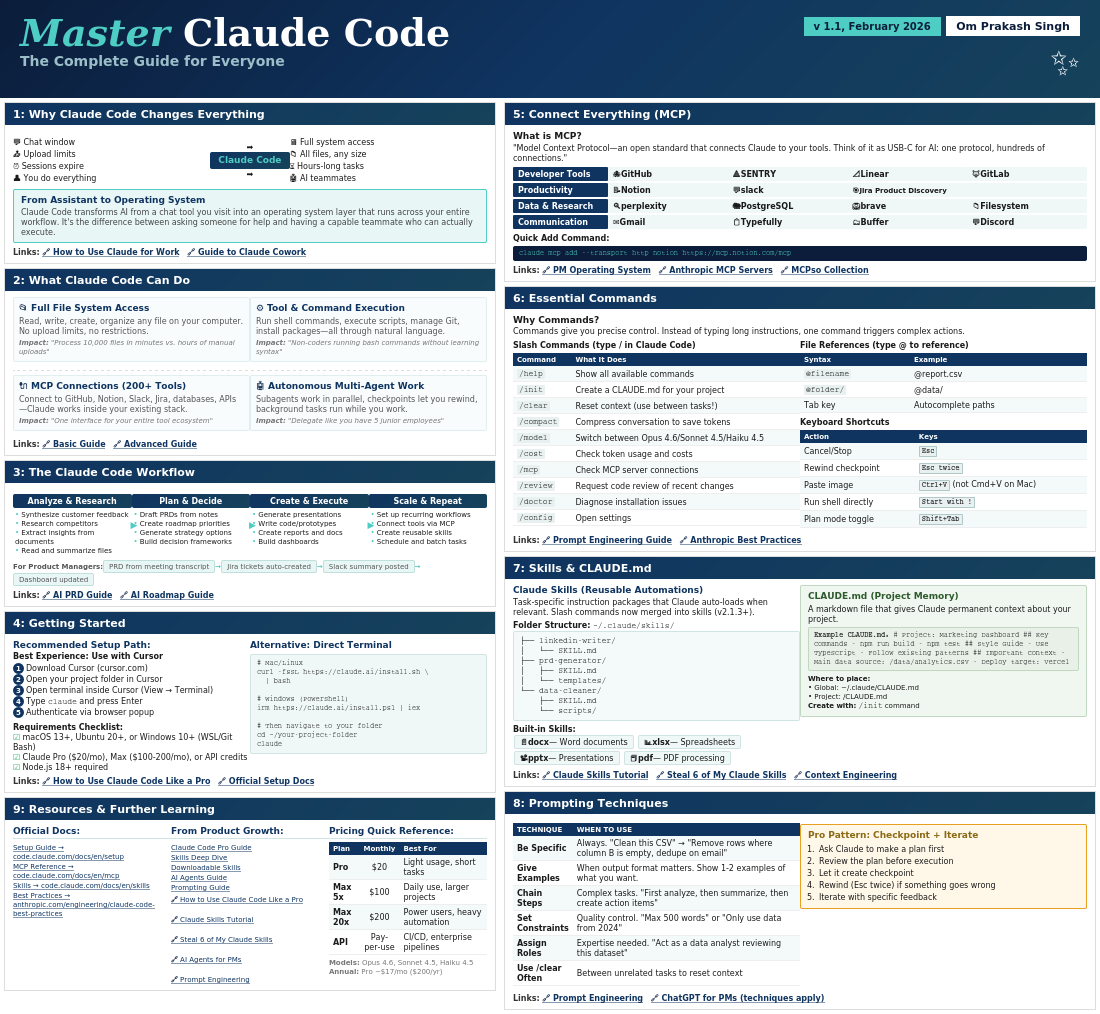
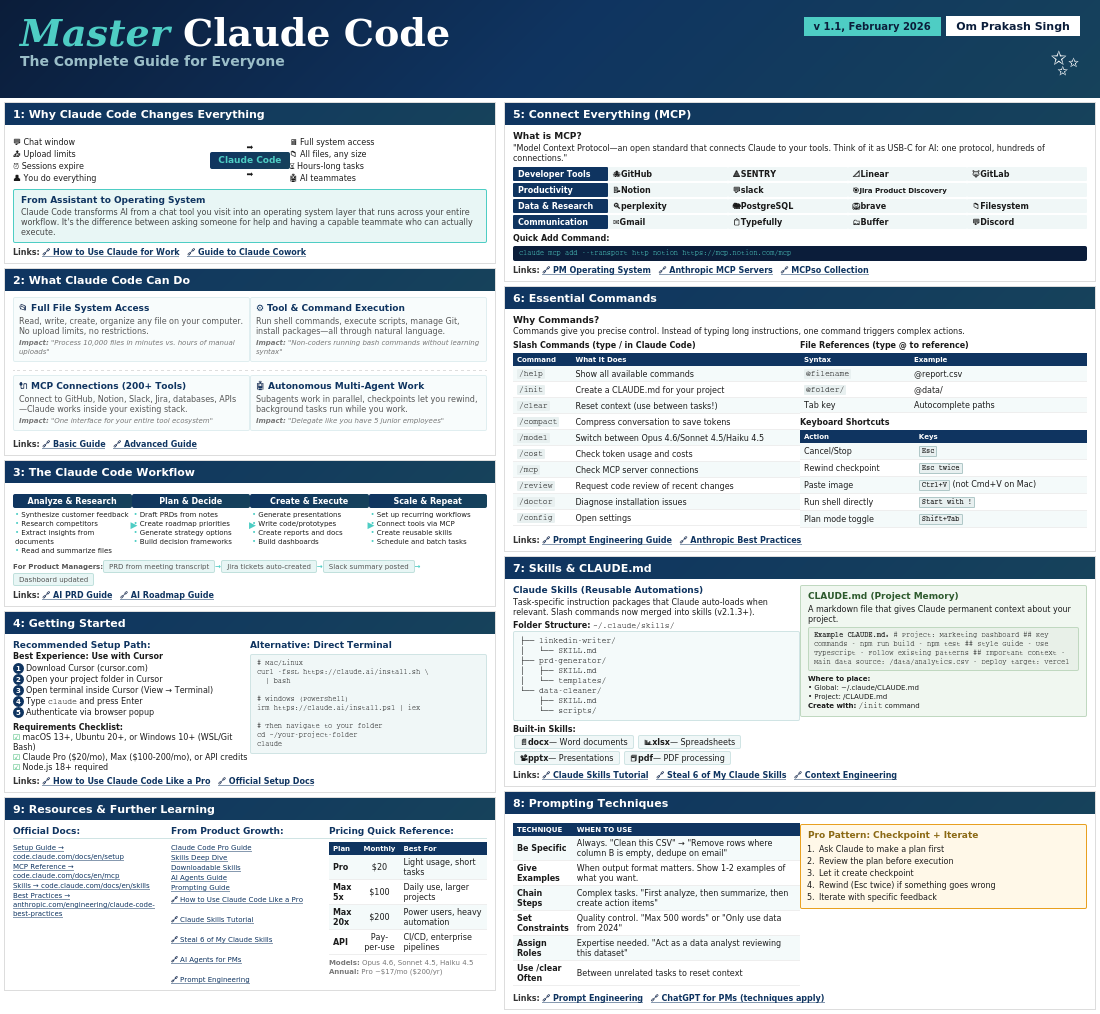
    Master Claude Code – Om Prakash Singh

    Master Claude Code

    The Complete Guide for Everyone

    v 1.1, February 2026 Om Prakash Singh
    1: Why Claude Code Changes Everything
    💬 Chat window
    📤 Upload limits
    ⏰ Sessions expire
    👤 You do everything
    ➡️
    Claude Code
    ➡️
    🖥️ Full system access
    📁 All files, any size
    ⏳ Hours-long tasks
    🤖 AI teammates
    From Assistant to Operating System

    Claude Code transforms AI from a chat tool you visit into an operating system layer that runs across your entire workflow. It’s the difference between asking someone for help and having a capable teammate who can actually execute.

    2: What Claude Code Can Do

    📂 Full File System Access

    Read, write, create, organize any file on your computer. No upload limits, no restrictions.
    Impact: “Process 10,000 files in minutes vs. hours of manual uploads”

    ⚙️ Tool & Command Execution

    Run shell commands, execute scripts, manage Git, install packages—all through natural language.
    Impact: “Non-coders running bash commands without learning syntax”

    🔌 MCP Connections (200+ Tools)

    Connect to GitHub, Notion, Slack, Jira, databases, APIs—Claude works inside your existing stack.
    Impact: “One interface for your entire tool ecosystem”

    🤖 Autonomous Multi-Agent Work

    Subagents work in parallel, checkpoints let you rewind, background tasks run while you work.
    Impact: “Delegate like you have 5 junior employees”
    3: The Claude Code Workflow
    Analyze & Research
    • Synthesize customer feedback
    • Research competitors
    • Extract insights from documents
    • Read and summarize files
    Plan & Decide
    • Draft PRDs from notes
    • Create roadmap priorities
    • Generate strategy options
    • Build decision frameworks
    Create & Execute
    • Generate presentations
    • Write code/prototypes
    • Create reports and docs
    • Build dashboards
    Scale & Repeat
    • Set up recurring workflows
    • Connect tools via MCP
    • Create reusable skills
    • Schedule and batch tasks
    For Product Managers: PRD from meeting transcript Jira tickets auto-created Slack summary posted Dashboard updated
    4: Getting Started
    Recommended Setup Path:
    Best Experience: Use with Cursor
    1Download Cursor (cursor.com)
    2Open your project folder in Cursor
    3Open terminal inside Cursor (View → Terminal)
    4Type claude and press Enter
    5Authenticate via browser popup
    Requirements Checklist:
    macOS 13+, Ubuntu 20+, or Windows 10+ (WSL/Git Bash)
    Claude Pro ($20/mo), Max ($100-200/mo), or API credits
    Node.js 18+ required
    Alternative: Direct Terminal
    # Mac/Linux curl -fsSL https://claude.ai/install.sh \ | bash # Windows (PowerShell) irm https://claude.ai/install.ps1 | iex # Then navigate to your folder cd ~/your-project-folder claude
    9: Resources & Further Learning

    Pricing Quick Reference:

    PlanMonthlyBest For
    Pro$20Light usage, short tasks
    Max 5x$100Daily use, larger projects
    Max 20x$200Power users, heavy automation
    APIPay-per-useCI/CD, enterprise pipelines
    Models: Opus 4.6, Sonnet 4.5, Haiku 4.5
    Annual: Pro ~$17/mo ($200/yr)
    5: Connect Everything (MCP)
    What is MCP?

    “Model Context Protocol—an open standard that connects Claude to your tools. Think of it as USB-C for AI: one protocol, hundreds of connections.”

    Developer Tools
    🐙 GitHub
    🔺 SENTRY
    📐 Linear
    🦊 GitLab
    Productivity
    📝 Notion
    💬 slack
    🎯 Jira Product Discovery
    Data & Research
    🔍 perplexity
    🐘 PostgreSQL
    🦁 brave
    📁 Filesystem
    Communication
    ✉️ Gmail
    📋 Typefully
    🗂️ Buffer
    💬 Discord
    Quick Add Command:
    claude mcp add –transport http notion https://mcp.notion.com/mcp
    6: Essential Commands
    Why Commands?

    Commands give you precise control. Instead of typing long instructions, one command triggers complex actions.

    Slash Commands (type / in Claude Code)
    CommandWhat It Does
    /helpShow all available commands
    /initCreate a CLAUDE.md for your project
    /clearReset context (use between tasks!)
    /compactCompress conversation to save tokens
    /modelSwitch between Opus 4.6/Sonnet 4.5/Haiku 4.5
    /costCheck token usage and costs
    /mcpCheck MCP server connections
    /reviewRequest code review of recent changes
    /doctorDiagnose installation issues
    /configOpen settings
    File References (type @ to reference)
    SyntaxExample
    @filename@report.csv
    @folder/@data/
    Tab keyAutocomplete paths
    Keyboard Shortcuts
    ActionKeys
    Cancel/StopEsc
    Rewind checkpointEsc twice
    Paste imageCtrl+V (not Cmd+V on Mac)
    Run shell directlyStart with !
    Plan mode toggleShift+Tab
    7: Skills & CLAUDE.md
    Claude Skills (Reusable Automations)

    Task-specific instruction packages that Claude auto-loads when relevant. Slash commands now merged into skills (v2.1.3+).

    Folder Structure: ~/.claude/skills/
    ├── linkedin-writer/
    │   └── SKILL.md
    ├── prd-generator/
    │   ├── SKILL.md
    │   └── templates/
    └── data-cleaner/
        ├── SKILL.md
        └── scripts/
    Built-in Skills: 📄 docx — Word documents 📊 xlsx — Spreadsheets 📽️ pptx — Presentations 📕 pdf — PDF processing

    CLAUDE.md (Project Memory)

    A markdown file that gives Claude permanent context about your project.

    Example CLAUDE.md: # Project: Marketing Dashboard ## Key Commands – npm run build – npm test ## Style Guide – Use TypeScript – Follow existing patterns ## Important Context – Main data source: /data/analytics.csv – Deploy target: Vercel
    Where to place:
    • Global: ~/.claude/CLAUDE.md
    • Project: /CLAUDE.md
    Create with: /init command
    8: Prompting Techniques
    TECHNIQUEWHEN TO USE
    Be SpecificAlways. “Clean this CSV” → “Remove rows where column B is empty, dedupe on email”
    Give ExamplesWhen output format matters. Show 1-2 examples of what you want.
    Chain StepsComplex tasks. “First analyze, then summarize, then create action items”
    Set ConstraintsQuality control. “Max 500 words” or “Only use data from 2024”
    Assign RolesExpertise needed. “Act as a data analyst reviewing this dataset”
    Use /clear OftenBetween unrelated tasks to reset context

    Pro Pattern: Checkpoint + Iterate

    1. Ask Claude to make a plan first
    2. Review the plan before execution
    3. Let it create checkpoint
    4. Rewind (Esc twice) if something goes wrong
    5. Iterate with specific feedback

  • When Your Lab Becomes the Problem: Why I Moved from VirtualBox to Multipass

    When Your Lab Becomes the Problem: Why I Moved from VirtualBox to Multipass

    Most people assume the hardest part of CKAD prep is Kubernetes itself, which is not really true.

    The API groups, the object specs, the speed, the pressure. That is the theory. In practice, the real challenge often hides somewhere else. For me, it appeared before I even typed the first kubectl command.

    It came from VirtualBox.

    I started my CKAD journey with a familiar mindset: keep everything local. A self-contained environment felt safe. No cloud costs. No accidental AWS instance running overnight. A 16 GB Mac should be able to handle a few VMs. VirtualBox was easy to install and widely used, so the decision felt harmless.

    But the early warning signs showed up quickly.

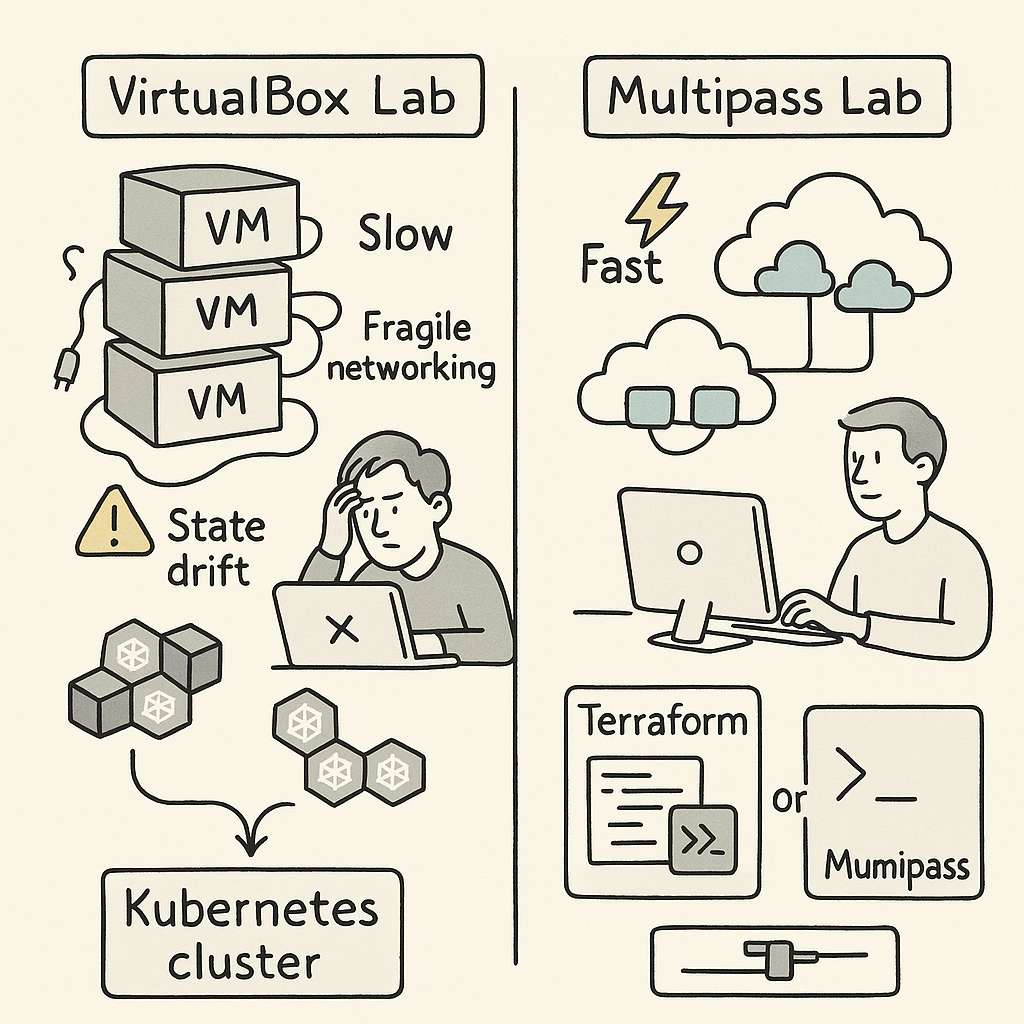
    VirtualBox VMs booted slowly. Some days they refused to start at all, because of improper shutdown, state issues. Networking behaved unpredictably. The host-only adapter never work with the cluster. I need to manually set additional interface for everything to work properly. DHCP leases would get stuck. Even a slight configuration change on the host could collapse the cluster setup. Every session started with “fix the lab” before I even got to “practice Kubernetes.”

    That was the first realization: the VM layer was consuming more attention than the exam material.

    To reduce the chaos, I tried to make the setup reproducible. I wrote provisioning scripts. I created Terraform configs. I stored reusable YAML manifests. The intention was simple. If the environment was stable, I could focus on higher-level Kubernetes concepts: Deployments, ConfigMaps, RBAC, resource limits, service discovery. But VirtualBox had its own logic. A week away from the labs and something broke again. State drift slowly ate away predictability.

    you can check everything on my git repo at

    https://github.com/omps/kubestronaut

    The bigger issue was hidden inside the workflow. VirtualBox is not lightweight. It runs complete VMs with full operating systems. Running multiple nodes on a 16 GB machine means you are always fighting for RAM and I/O. When nodes slow down, Kubernetes slows down. And when Kubernetes slows down, even simple tasks start taking more time than they should.

    None of this helped me get better at Kubernetes. It only helped me become better at debugging VirtualBox. I was feeling stuck and helpless and spending a lot of time fixing labs. During the practice session the results are not consistent causing me more trouble.

    Eventually, I asked a simple question:
    Why am I fighting my tools more than I’m learning the subject?

    That pushed me to explore alternatives. I didn’t want full cloud cost exposure. I didn’t want minikube because it didn’t match multi-node workflows. I didn’t want Docker Desktop for the same reason. I wanted something predictable, fast, and disposable.

    That is when I moved to Multipass.

    The difference was immediate. Multipass offered a cleaner, lighter way to run Ubuntu instances. No heavy UI. No complex host adapters. No tangled virtualization settings. It gave me minimal virtual machines that behaved like cloud instances without the cloud price. Instances launched quickly, networking was straightforward, and I could reset everything in seconds.

    Most importantly, the environment did not drift.

    Every lab session began exactly the same way as the previous one. That was the turning point. Consistency is a hidden productivity multiplier in CKAD prep. When your muscle memory builds around predictable infrastructure, each new concept sits more cleanly in your head. With Multipass, I was no longer solving host problems. I was solving Kubernetes problems.

    It also removed the overhead of maintaining Terraform for local labs. Terraform was useful but still tied to VirtualBox’s VM lifecycle. In Multipass, a single command created an instance that felt almost cloud-native. It aligned better with how Kubernetes clusters behave in real environments.

    Once the infrastructure friction disappeared, the actual exam prep began to move faster. I could practice object creation, troubleshoot pods, play with services, experiment with ConfigMaps, and attempt exercises repeatedly without waiting for VMs to warm up.

    A few lessons from this cycle are worth calling out for anyone preparing for CKAD:

    First, the exam environment now includes command completion and essential aliases.
    Stop wasting time installing bash completion or trying to replicate shortcuts or create aliases during exam. The exam already gives you what you need. Use that time to master object structure and common tasks.

    Second, embrace --dry-run=client -o yaml.
    This is one of the fastest ways to generate object manifests without writing YAML manually. It helps you think in terms of Kubernetes objects instead of memorizing syntax.

    Third, understand how Kubernetes models everything as an object.
    Whether it is a Deployment, Service, ConfigMap, Secret, Pod, Role, or StorageClass, each one is built from desired state, metadata, and spec. Once this mental model clicks, CKAD becomes far easier to navigate.

    Fourth, know when to use run and when to use create.
    kubectl run is built for temporary, single-pod scenarios. It is good for debugging and quick tests.
    kubectl create targets real objects. It is the gateway to reproducible YAML and is relevant across the entire Kubernetes API.

    These are the foundations of CKAD speed.

    But the deeper insight is this:
    The environment you choose shapes the quality of your learning.

    VirtualBox worked, but it pulled me into infrastructure rabbit holes that had nothing to do with the exam. The mental fatigue was real. Multipass removed the noise and gave me room to think. The result was better consistency, better focus, and far more productive study hours.

    If your CKAD prep feels slower than expected, don’t rush to blame Kubernetes. Examine your environment. A fragile setup will drain your energy and dilute your progress. A clean, lightweight one will amplify your momentum.

    For me, the shift from VirtualBox to Multipass turned CKAD prep from a frustrating grind into a structured learning path. That is why I recommend evaluating your tooling early. The right environment does not make Kubernetes easier, but it makes learning it far more efficient.

    Sometimes the fastest path to mastery is removing the obstacles you didn’t even realize were slowing you down.

  • Mixture-of-Experts (MoE) Explained: How Trillion-Parameter AI Models Actually Work

    Mixture-of-Experts (MoE) Explained: How Trillion-Parameter AI Models Actually Work

    Decoding AI Models: My Journey from Jargon to Clarity

    The other evening, I was casually browsing OpenRouter, a platform that lets you explore and compare different AI models. I wasn’t looking for anything in particular, just curious about how the newer models stacked up against the usual suspects like GPT-4 or Claude.

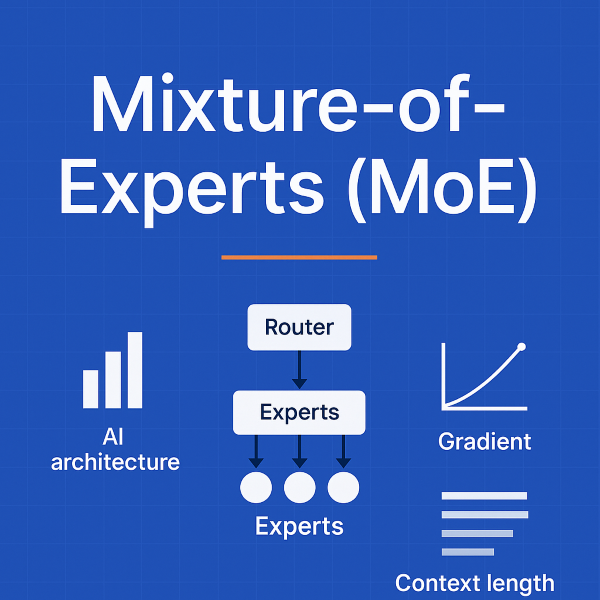
    And then, I stumbled upon this summary 👇

    At first glance, it looked impressive — big numbers, fancy names, and technical terms. But let’s be honest: unless you live and breathe AI research, it reads like another alphabet soup.

    So, I decided to slow down. What do these words actually mean? And why should they matter to us — whether we’re building, leading, or just trying to understand the AI shift?


    Context Length: The Model’s Memory

    One of the first things that stood out was context length. In simple terms, it’s how much text a model can “see” at once.

    • A smaller model might only remember a few pages of conversation.
    • The bigger ones, like Grok 4 Fast, can handle 2 million tokens — that’s like feeding an entire bookshelf of books and still getting a coherent answer back.

    Think of it as working memory for AI. Short memory means fragmented thoughts. Long memory means deep analysis across huge documents, codebases, or conversations.


    Mixture-of-Experts (MoE): Not Every Brain Cell at Once

    Then came the phrase: 1T parameters with 32B active per forward pass.

    Here’s the trick: not all of those trillion parameters are working every time. That’s the beauty of Mixture-of-Experts (MoE).

    Instead of a model where every neuron fires for every input (dense models), MoE routes your query to just a few specialized experts:

    • Ask for math? It finds the math expert.
    • Need code? It calls in the coding expert.
    • Want natural language? Another expert takes over.

    This way, the model has massive capacity but only spends energy where it matters.


    Gradients & Routing: The Hidden Plumbing

    As I dug deeper, I realized training these models is not just about scale — it’s about stability.

    • Gradient: Think of it as the GPS signal that tells the model how to improve. Too weak, and the model doesn’t learn. Too strong, and it crashes.
    • Routing: Imagine an air traffic controller deciding which “expert runway” each input should land on. Balanced routing means experts stay healthy; unbalanced routing means some get lazy, others burn out.

    This is why new optimizers like MuonClip exist — they keep trillion-parameter models from collapsing under their own weight.


    Quantization: The Art of Compression

    Another technical term: fp8 quantization.

    Instead of using heavy 32-bit numbers for everything, models store weights in 8-bit floating-point format. Think of it as compressing photos on your phone — smaller size, faster load, almost no visible difference. For trillion-parameter models, this is the difference between “runs in theory” and “runs in reality.”


    The Business Side: Pricing in Tokens

    Finally, the pricing model clicked.

    Most APIs don’t charge for time — they charge by tokens. And they split it into two sides:

    • Input tokens (your prompt).
    • Output tokens (the model’s reply).

    For example, Kimi K2 costs $0.38 per million input tokens and $1.52 per million output tokens. So, pasting in a 500-page PDF and getting back a 2,000-word summary might cost just a few cents.


    The Takeaway

    As I pieced it all together, one thing became clear:
    These models aren’t just growing bigger. They’re growing smarter.

    • MoE gives us scale without waste.
    • Gradients and routing keep the training balanced.
    • Quantization makes it practical.
    • Context length opens up whole new use cases.

    The hype isn’t in the jargon. The magic is in the architecture.


    The Open Question

    So here’s what I’m left wondering — and maybe you are too:

    👉 Will Mixture-of-Experts become the standard blueprint for future AI?
    Or will dense + retrieval hybrids (like retrieval-augmented generation, RAG) still dominate?

    Because if history is any guide, the answer won’t just shape AI research. It’ll shape how we all interact with intelligence itself.


    ✍️ What do you think?

    Reply in comments

    #AI #LLM #MachineLearning #FutureOfAI #OpenRouter

  • Super AI Ops

    AI-Powered Solutions for MSPs: Hackathon Innovation Guide

    AI-Powered
    Solutions for MSPs

    Transforming managed services through strategic AI innovation—from immediate automation to future-forward autonomous systems

    Amazon Bedrock Generative AI Strategic Innovation

    Immediate Impact

    Practical AI solutions ready for implementation today

    Future Vision

    Autonomous agents and predictive systems for tomorrow

    Executive Summary

    For your hackathon submission, you can develop a range of AI-powered solutions for MSPs using the Amazon tech stack. This comprehensive guide outlines both immediate-use solutions and future-forward concepts across four critical themes.

    Immediate Solutions

    • AIOps pipeline with Amazon Bedrock
    • Collaborative AI knowledge base with Amazon Kendra
    • AI-driven client proposal generator with ChatGPT
    • ChatGPT-powered ticketing system

    Future Concepts

    • Autonomous IT agents with Amazon Bedrock AgentCore
    • Agentic AI community hub
    • AI-optimized financial forecasting system
    • Hyper-personalized AI assistants

    This strategic framework provides a roadmap for innovation in IT Operations, Open Innovation, Growth and Financial Improvement, and IT Service Delivery—leveraging AWS's comprehensive AI tech stack including Amazon Bedrock, Gemini, and ChatGPT capabilities.

    IT Operations

    Transforming operational efficiency through intelligent automation and predictive analytics

    Immediate Use: AIOps Pipeline with Amazon Bedrock

    The immediate application of an AIOps pipeline, powered by Amazon Bedrock, presents a transformative opportunity for MSPs to enhance operational efficiency, reduce manual intervention, and improve the reliability of IT infrastructures. This solution leverages generative AI to automate and optimize key operational tasks, moving beyond traditional reactive support models.

    Real-time System Monitoring

    Integrate Amazon Bedrock with CloudWatch and Lambda for continuous log ingestion and intelligent analysis, identifying anomalies and patterns missed by traditional monitoring systems.

    Automated Incident Response

    Leverage AWS Step Functions to orchestrate automated remediation workflows, from service restarts to resource scaling, reducing manual intervention.

    Predictive Analytics

    Analyze historical data to predict future failures, enabling proactive maintenance and moving from reactive "break-fix" to preventive care.

    AI operations center dashboard

    "This approach aligns with the broader industry trend of adopting AI to manage the increasing complexity of modern IT systems, where manual monitoring and troubleshooting are no longer scalable or effective."

    Future Concept: Autonomous IT Agents with Amazon Bedrock AgentCore

    The future of IT operations lies in autonomous IT agents, powered by Amazon Bedrock AgentCore. These agents represent a leap toward self-healing infrastructure, capable of understanding underlying causes, learning from experiences, and continuously improving performance.

    Self-Healing Infrastructure

    Continuous monitoring and proactive issue resolution without human intervention

    Proactive Detection

    Advanced diagnosis and root cause analysis before issues impact users

    Fully Automated Workflows

    End-to-end service lifecycle management from provisioning to decommissioning

    Autonomous AI agents operating in a data center environment

    This concept represents a paradigm shift from automated workflows to truly autonomous IT management, enabling MSPs to deliver unprecedented service levels.

    Open Innovation

    Breaking down knowledge silos and fostering collaborative innovation across the MSP ecosystem

    Immediate Use: Collaborative AI Knowledge Base with Amazon Kendra

    Address knowledge silos by building a shared knowledge repository using Amazon Kendra. This intelligent search service powered by machine learning creates a highly accurate enterprise search solution that breaks down information barriers.

    Shared Knowledge Repository

    Centralized repository built with Amazon S3, DynamoDB, and CloudFront for storing technical documentation, best practices, and client-specific information.

    Amazon S3 DynamoDB CloudFront

    Intelligent Search & Problem-Solving

    Natural language search capabilities with Amazon Comprehend and Translate integration for multilingual support and enhanced accuracy.

    Key Benefits

    • Reduced time to find critical information
    • Improved service delivery quality
    • Faster employee onboarding
    • Enhanced knowledge reuse and sharing

    Future Concept: Agentic AI Community Hub

    AI community hub concept

    The next evolution of Open Innovation is an Agentic AI Community Hub—a collaborative platform where MSPs share knowledge, tools, and best practices for implementing AI in IT operations. This hub creates a vibrant ecosystem for co-developing AI solutions.

    Collaborative Development

    Shared development environment with pre-trained models and APIs

    Agent Marketplace

    Platform for sharing and monetizing AI agents and tools

    Ecosystem Innovation

    Fostering innovation across the entire MSP community

    Growth and Financial Improvement

    Driving business growth through AI-powered automation and strategic financial optimization

    Immediate Use: AI-Driven Client Proposals with ChatGPT via Amazon Bedrock

    Leverage ChatGPT through Amazon Bedrock to automate and enhance the entire proposal development lifecycle. This solution streamlines core proposal documents, marketing materials, service descriptions, and sophisticated financial models. [166]

    Automated Personalization

    Transform basic client information into comprehensive, tailored proposals with industry-specific compliance considerations like HIPAA and PCI DSS.

    CRM Integration

    Seamless integration with HubSpot or Salesforce for automated proposal generation from existing client data. [166]

    AI generating business proposal documents

    Marketing Automation

    Generate detailed service descriptions, case studies, and supporting collateral with consistent messaging and branding. [166]

    ROI Calculator and Financial Forecasts

    Automate development of sophisticated ROI calculators that consider implementation costs, operational savings, productivity gains, and risk mitigation benefits. [166]

    Cost Analysis

    Savings Projection

    Risk Mitigation

    Future Concept: AI-Optimized Financial Forecasting

    Evolve from static proposals to dynamic, continuous financial optimization. This comprehensive platform leverages advanced AI models to analyze vast amounts of data, predict future trends, and provide actionable insights for maximizing revenue and profitability.

    Client Usage Pattern Analysis

    Deep analysis of client usage patterns and true service delivery costs, identifying opportunities for upselling, cross-selling, and pricing optimization.

    Predictive Financial Modeling

    Forecast future revenue, predict client churn, and simulate financial impact of strategic decisions using advanced machine learning models.

    Dynamic Pricing Optimization

    Implement flexible, data-driven pricing that adjusts based on client usage, market demand, and competitor pricing to maximize revenue.

    AI-powered financial forecasting system interface

    Integration Points

    • PSA Tools
    • RMM Platforms
    • Accounting Software
    • Market Data Sources

    Strategic Transformation

    Transform financial management from reactive analysis to proactive strategic planning, enabling data-driven decisions that drive sustainable growth and competitive advantage.

    IT Service Delivery

    Enhancing service quality and efficiency through intelligent automation and personalized support experiences

    Immediate Use: ChatGPT-Powered Ticketing System

    Implement a ChatGPT-powered ticketing system to improve service delivery efficiency. This solution automates ticket classification, provides intelligent suggestions, and enhances SLA monitoring through AI-driven insights.

    Automated Classification & Routing

    AI automatically analyzes ticket content, classifies by category and priority, and routes to appropriate support teams.

    Intelligent Suggestions

    Provides suggested solutions and knowledge base references to users and agents for faster resolution.

    SLA Monitoring

    Automatic tracking and reporting of SLA performance with trend analysis and breach identification.

    AI-powered ticketing system interface

    System Benefits

    ↑ 40%

    Efficiency Increase

    ↓ 60%

    Resolution Time

    ↑ 95%

    SLA Compliance

    ↓ 30%

    Support Costs

    Future Concept: Hyper-Personalized AI Assistants

    Personalized AI assistant helping a user with their computer

    The future of IT service delivery lies in hyper-personalized AI assistants—intelligent digital companions that provide truly personalized and proactive support experiences. These assistants go beyond traditional chatbots, understanding unique user needs, preferences, and behaviors.

    AI-Powered Digital Assistants

    Personalized support understanding user role, location, and device context

    Personalized Experiences

    Learning from past interactions and anticipating future needs with emotional intelligence

    Predictive Support

    Identifying potential issues before they occur based on user behavior analysis

    Ultimate Goal: Proactive User Empowerment

    Transform IT support from reactive problem-solving to proactive user empowerment, enhancing productivity and security while reducing support requests through intelligent anticipation and guidance.

    Implementation Roadmap

    Strategic approach to deploying AI solutions for MSPs

    1

    Foundation Phase

    • • AIOps Pipeline Setup
    • • ChatGPT Ticketing
    • • Basic Monitoring
    2

    Enhancement Phase

    • • AI Proposal Generator
    • • Kendra Knowledge Base
    • • Automated Responses
    3

    Optimization Phase

    • • Financial Forecasting
    • • Predictive Analytics
    • • Dynamic Pricing
    4

    Innovation Phase

    • • Autonomous Agents
    • • AI Community Hub
    • • Personalized Assistants

    Ready to Transform Your MSP?

    These AI-powered solutions represent the future of managed services. Start with immediate-impact implementations and build toward autonomous, intelligent operations.

    Amazon Bedrock ChatGPT AWS Services Innovation Ready

  • Red Hat High Availability Clustering: A Technical Guide to Fault Tolerance & Data Consistency


    When critical workloads can’t afford downtime, Red Hat High Availability Clusters step in to keep services running, ensure data stays consistent, and eliminate single points of failure. Built on the solid foundation of the High Availability Add-On, these clusters use a mix of resource orchestration, fault detection, and fencing mechanisms to deliver enterprise-grade uptime.

    Whether you’re a Linux engineer, system architect, or platform owner evaluating RHEL clustering, this deep dive walks you through its architecture, components, and strategies for maintaining availability and integrity.


    🔧 What Makes a Cluster “Highly Available”?

    At the heart of RHEL HA is the High Availability Add-On, which transforms a group of RHEL systems (called nodes) into a cohesive cluster. This cluster continuously monitors each member, takes over services when failures occur, and ensures clients never know something went wrong.

    Clusters built using this RH-HA:

    • Avoid single points of failure
    • Automatically failover services
    • Maintain data integrity during transitions

    Key tools in the stack include:

    • Pacemaker: The brain of the cluster that manages resources
    • Corosync: Handles messaging, quorum, and membership
    • STONITH (Fencing): Ensures failed nodes are completely cut off
    • GFS2 and lvmlockd: Enable active-active shared storage access

    🧠 Core Components of RHEL High Availability

    1. Pacemaker: Resource Management Engine

    Pacemaker is the cluster’s resource orchestrator, comprising several daemons:

    • CIB: Holds configuration/status in XML, synced across all nodes
    • CRMd: Schedules actions like start/stop/move for resources
    • LRMd: Interfaces with local agents to execute actions and monitor state

    2. Corosync: Messaging Backbone

    Corosync ensures all nodes talk to each other reliably. It manages:

    • Membership and quorum determination
    • Messaging and state sync via kronosnet
    • Redundant links and failover networking

    3. Fencing (STONITH): Last Line of Defense

    If a node stops responding, how do you guarantee it won’t corrupt data? Enter fencing.

    • STONITH (“Shoot The Other Node In The Head”) cuts power or access to failed nodes
    • Prevents dual writes and split-brain scenarios
    • Required (stonith-enabled=true) for production clusters

    Examples:

    • Redundant power fencing ensures both power supplies of a node are killed
    • Use fencing delays (pcmk_delay_base, priority-fencing-delay) to avoid race conditions

    🧩 Ensuring Quorum and Preventing Split-Brain

    A cluster needs quorum (majority vote) to make decisions. Without it, Pacemaker halts all resources to protect data.

    • votequorum service tracks voting nodes
    • no-quorum-policy:
    • stop (default): Stops all services
    • freeze: Useful for GFS2 where shutdowns require quorum
    • Quorum devices (net-based) help even-node clusters survive more failures
    • Algorithms: ffsplit, lms

    💾 Storage Strategies for Data Consistency

    1. Shared Storage

    Failover only works if the new node can access the same data. Supported mediums include:

    • iSCSI
    • Fibre Channel
    • Shared block devices

    2. LVM in Clusters

    • HA-LVM: Active/passive, single-node access at a time
    • lvmlockd: Enables active/active access, works with GFS2

    3. GFS2: The Cluster File System

    • Allows simultaneous block-level access from multiple nodes
    • Requires Pacemaker, Corosync, DLM, and lvmlockd
    • Supports encrypted file systems (RHEL 8.4+)

    ⚙️ Resource Management Tactics

    Resources in Pacemaker are abstracted via agents. They can be grouped, ordered, colocated, and monitored with high precision.

    Key controls:

    • Groups: Start in order, stop in reverse
    • Constraints:
      • Location (where)
      • Ordering (when)
      • Colocation (with whom)
    • Health checks: Automatic monitoring with customizable failure policies
    • migration-threshold: Move resource after N failures
    • start-failure-is-fatal: Node marked bad after failed start
    • multiple-active: What to do if resource runs on >1 node
    • shutdown-lock: Prevents unnecessary failovers during planned maintenance

    🌐 Multi-Site Clustering & Remote Nodes

    1. Booth Ticket Manager

    Manages split-brain in geo-distributed clusters. Tickets control which site holds resource ownership.

    2. pacemaker_remote

    Lets you add nodes that don’t run Corosync (e.g., VMs) into your cluster:

    • Extend cluster size beyond 32 nodes
    • Useful for managing cloud VMs or containers

    🛠️ Configuration Tools

    Red Hat provides two main tools to manage the cluster:

    • pcs (CLI)
    • pcsd (Web UI)

    Tasks made simple:

    • Cluster creation
    • Adding/removing nodes
    • Config changes (live)
    • Viewing status and logs

    ✅ Summary: Why RHEL HA Matters

    If your workloads can’t go down—and your data can’t risk corruption—RHEL HA offers:

    • Mature, enterprise-tested components
    • Consistent handling of failovers and fencing
    • Flexibility for active/active and geo-distributed clusters
    • Integrated tooling for automation and visibility

    Start with two nodes. Plan your fencing. Decide quorum policies. Add shared storage. Then scale.

    When uptime matters, RHEL High Availability Add-On delivers.


    Have questions or want a deeper walkthrough? Contact us at OmOps or explore more Linux and infrastructure insights on our blog.

  • Difference between RHEL 7 and RHEL 8 HA

    Red Hat Enterprise Linux (RHEL) 8 introduces several enhancements and changes to its High Availability (HA) Add-On compared to RHEL 7, primarily building upon and refining the Pacemaker and Corosync technologies.

    Here are the key differences:

    Tech StackRHEL 7RHEL 8
    Core HA Technologies and Storage Management
    Cluster Logical Volume Management (CLVM) vs. LVM Locking Daemon (lvmlockd)the High Availability Add-On used `clvmd` (Cluster Logical Volume Manager) for volume management of cluster storage, specifically for active/active configurations with GFS2.replaces `clvmd` with the LVM Locking Daemon (lvmlockd) for managing shared storage devices in active/active configurations, where more than one node requires simultaneous access to storage. `lvmlockd` works in conjunction with the Distributed Lock Manager (`dlm`)
    LVM Volume Activationused `lvmconf –enable-halvm` to configure HA-LVM RHEL 8.5 and later, when creating LVM volume groups managed by Pacemaker, you can use the `vgcreate –setautoactivation n` flag to prevent automatic activation on startup.
    In earlier versions, disabling auto-activation required modifying the `auto_activation_volume_list` in `/etc/lvm/lvm.conf` and rebuilding the `initramfs` boot image.
    GFS2 File Systemsalso provides a specific procedure for migrating GFS2 file systems from RHEL 7, which involves changing the volume group’s lock type from `none` to `dlm` and ensuring the RHEL 8 cluster has the same name as the RHEL 7 cluster.leverages `lvm2-lockd`, `gfs2-utils`, and `dlm` packages for GFS2 configurations. It supports encrypted GFS2 file systems using the `crypt` resource agent.
    Cluster Management and Configuration Tools
    pcs Command Enhancementspcs` commands can now export configurations for recreation on different systems, including cluster properties (`pcs property config –output-format=cmd`), fence devices (`pcs stonith config –output-format=cmd`), and cluster resources (`pcs resource config –output-format=cmd`).
    pcs resource defaults update` is the preferred command for changing global resource option defaults over the older `pcs resource defaults name=value`.
     The `pcs cluster config` command can display the `corosync.conf` file in a human-readable format and includes the Cluster UUID if created in RHEL 8.7 or later or manually added.
    Resource DisplayThe `pcs resource relations` command can display resource dependencies in a tree structure. Also, `pcs constraint list` no longer displays expired constraints by default; the `–all` option is needed to include them.

    New commands `pcs resource status resource_id` and `pcs resource status node=node_id` for displaying status of individual resources or resources on a specific node.
    Fencing Improvements
    Fencing DelaysIntroduced the priority-fencing-delay cluster property, which allows a two-node cluster to fence the node with the fewest or least important resources in a split-brain situation. This delay is additive to `pcmk_delay_base` and `pcmk_delay_max`The `pcmk_delay_base` parameter allows specifying different fencing delays for individual nodes even when using a single fence device.
    fence-reaction PropertyThe `fence-reaction` cluster property was introduced to determine how a node should react if notified of its own fencing. The default is `stop`, but `panic` (attempts immediate reboot) is considered safer.
    Concurrent Fencingconcurrent-fencing=true` became the default, allowing fencing operations to be performed in parallel.
    pcmk_host_mapThe `pcmk_host_map` property for fencing devices supports special characters in host alias values.
    Quorum and Multi-Site Clusters
    Quorum Devicesprovided full support for a separate quorum device (corosync-qnetd) to sustain more node failures, especially recommended for clusters with an even number of nodes. 
    Multi-Site Clusters (Booth)provided full support for configuring multi-site clusters using the Booth cluster ticket manager, 
    Disaster Recovery (DR) ClustersThe `pcs dr` commands allow displaying the status of both primary and disaster recovery clusters from a single node. This facilitates monitoring but does not automate resource configuration or data replication, which must be handled manually.
    Resource Behavior and Options
    shutdown-lock PropertyIntroduced the `shutdown-lock` cluster property. When set to `true`, resources on a node undergoing a clean shutdown will be locked to that node and prevented from failing over to other nodes until the node rejoins the cluster, ideal for maintenance windows.
    Safer Resource DisablingNew `pcs resource disable` options like `–simulate`, `–safe`, and `–safe –no-strict` allow administrators to assess or perform resource disabling with greater control and avoid unintended side effects.
    Resource Tagstag cluster resources using the `pcs` command. This allows enabling, disabling, managing, or unmanaging a specified set of resources with a single command.
    multiple-active optionThe `multiple-active` resource meta option gains a new value, `stop_unexpected`, which only stops unexpected active instances of a resource without requiring a full restart of all instances.
    allow-unhealthy-nodesIntroduced the `allow-unhealthy-nodes` resource meta option, which, when set to `true`, prevents a resource from being forced off a node due to degraded node health, allowing the cluster to move resources back once health recovers.
    Node Health Strategynode health strategy in Pacemaker to automatically move resources off unhealthy nodes. This works in conjunction with health resource agents like `ocf:pacemaker:HealthCPU`, `HealthIOWait`, `HealthSMART`, and `SysInfo`, which set node attributes based on system health. The strategy can be configured to `migrate-on-red`, `only-green`, `progressive`, or `custom`.
    Virtualization Integration
    pacemaker_remote DaemonBoth RHEL 7 and RHEL 8 support the `pacemaker_remote` service for integrating non-Corosync nodes (remote nodes and guest nodes) into the cluster, enabling scaling beyond the traditional node limits.

    The handling of `authkey` and the commands for adding remote/guest nodes were refined in RHEL 7.4 (`pcs cluster node add-guest` and `pcs cluster node add-remote` replaced older commands), with RHEL 8 continuing these updated commands.

    In RHEL 7.3 and later (and thus RHEL 8), if `pacemaker_remote` stops, resources are gracefully migrated off the node. In RHEL 7.2 and earlier, this would have caused fencing.
    Virtual Domain ResourcesBoth RHEL 7 and RHEL 8 support configuring `libvirt`-managed virtual domains as cluster resources. `VirtualDomain` resource options like `force_stop`, `migration_transport`, and `snapshot`. The `allow-migrate` metadata option enables live migration without state loss for VMs managed as cluster resources.

    Note that live migration for full cluster nodes (not managed as resources) is generally not supported and requires manual removal/re-addition to the cluster.
  • Setting Up Kubernetes on Vagrant: What Broke, What I Fixed, and What I Learned”

    Setting Up Kubernetes on Vagrant: What Broke, What I Fixed, and What I Learned”

    You know when you think something’s going to be quick and easy, but it ends up being a rabbit hole of learning? That’s exactly what happened when I tried setting up a Kubernetes cluster on Vagrant using VirtualBox.

    This blog is about all the hiccups I hit, how I fixed them, and what I learned along the way. If you’re doing something similar or planning to, maybe this will save you some time and headaches.


    I Decided to Build My Own Cluster

    After attending KubeCon Delhi in December 2024, I came back inspired to level up my Kubernetes game. I’m doing the Kubestronaut certification, and rather than use something managed like EKS or GKE, I decided to roll up my sleeves and do it all manually.

    It sounded simple. Spin up a couple of Vagrant boxes with VirtualBox, install Kubernetes, and go. But as I found out, theory and practice are not the same thing.


    The Setup

    I used a Vagrantfile to spin up a control-plane node and a worker node.

    Vagrantfile (Snippet)

    Vagrant.configure("2") do |config|
      config.vm.box = "ubuntu/focal64"
    
      config.vm.define "k8s-controller" do |node|
        node.vm.hostname = "k8s-controller"
        node.vm.network "private_network", ip: "192.168.33.10"
      end
    
      config.vm.define "k8s-node1" do |node|
        node.vm.hostname = "k8s-node1"
        node.vm.network "private_network", ip: "192.168.33.11"
      end
    end

    Where It Started Going Sideways: Networking Woes

    So VirtualBox sets every VM’s default NAT IP to 10.0.2.15. If you don’t set up a second network (like a host-only adapter), Kubernetes nodes just can’t talk properly to each other.

    Also, I forgot to set the --apiserver-advertise-address, and Kubernetes defaulted to the NAT IP. That meant the worker node couldn’t find the control plane. This is important to always point to host-adapter or your secondary NIC.


    The Wall of Errors (and Fixes)

    container runtime is not running

    What it means: containerd wasn’t running.

    Simply fix by,

    sudo apt install -y containerd
    containerd config default | sudo tee /etc/containerd/config.toml
    sudo systemctl restart containerd kubelet

    kubelet-start: timed out waiting for the condition

    Why it happens: Kubelet can’t talk to the API server, usually because the config is missing or wrong, or CNI isn’t ready.

    Can be resolved by running

    sudo systemctl restart kubelet

    NetworkPluginNotReady: cni plugin not initialized

    Root cause: Calico wasn’t running. Either because the binaries were missing or iptables was blocking traffic.

    To fix need to apply the calico.yaml file so the pod networking can be setup.

    kubectl apply -f https://docs.projectcalico.org/manifests/calico.yaml

    Also ensure CNI plugins are installed:

    sudo mkdir -p /opt/cni/bin
    wget -qO- https://github.com/containernetworking/plugins/releases/download/v1.1.1/cni-plugins-linux-amd64-v1.1.1.tgz | sudo tar -xz -C /opt/cni/bin

    AppArmor and Firewall Madness

    • AppArmor was causing container launch failures.
    • The firewall (UFW) and iptables were messing with CNI networking.

    This one is difficult to identify and is easier to overlook, fix this by running the following commands:

    sudo systemctl stop apparmor
    sudo systemctl disable apparmor
    sudo systemctl disable --now ufw
    sudo iptables -F
    sudo iptables -tnat -F

    Clean Reset and Rebuild

    When nothing worked and after going in circles, I wiped it all out and restarted everything.

    sudo kubeadm reset -f
    sudo systemctl restart containerd kubelet

    Updated Hosts File

    192.168.33.10 k8s-controller
    192.168.33.11 k8s-node1

    Re-initialize Kubernetes

    sudo kubeadm init --apiserver-advertise-address=192.168.33.10 --pod-network-cidr=192.168.0.0/16

    Configure kubectl on the host

    mkdir -p $HOME/.kube
    sudo cp /etc/kubernetes/admin.conf $HOME/.kube/config
    sudo chown $(id -u):$(id -g) $HOME/.kube/config

    Worker Node Join

    Copied the kubeadm join command from the output of the init and ran it on the worker node.


    Accessing the Kubernetes cluster From My Laptop

    scp vagrant@k8s-controller:/etc/kubernetes/admin.conf ~/.kube/config
    chmod 600 ~/.kube/config

    Final Thoughts: What I Learned

    • Most of the errors can be simply fixed by proper Networking and VirtualBox + Vagrant need that extra private_network for everything to work.
    • The --apiserver-advertise-address must be a reachable IP. NAT won’t work here.
    • AppArmor, UFW, and iptables can break Kubernetes in subtle ways.
    • If Calico fails to start, look at your CNI paths and system services.

    This whole process was a grind, but now I get why people say: if you want to learn Kubernetes, build your own cluster.

    Hope this helps you avoid the same potholes. If you’ve been through similar issues — or fixed them another way — I’d love to hear from you.

    Happy hacking!

  • AI-Powered Cloud Services

    Below offers a range of examples of AI-powered cloud services, but they do not provide a complete listing of AIaaS offerings by major companies. Please go through the cloud provider websites to find more offering from them.

    CompanyServiceDescription
    Microsoft AzureAzure Machine LearningEnables businesses to build, deploy, and manage machine learning models.
    Microsoft Azure OpenAI ServiceIntegrates OpenAI’s models, including ChatGPT, for better customer engagement and streamlined operations.
    Azure Cognitive ServicesOffers pre-built AI models for vision, speech, language, decision-making, and more.
    Google CloudGoogle Cloud AutoMLHelps optimise resource allocation for efficient use of computing resources.
    Vertex AISimplifies building, training, and deploying machine learning models and offers flexibility for using open models.
    Google Cloud’s Vision AIHelps businesses understand images using pre-trained models or custom models.
    Google Cloud’s Natural Language AIExtracts insights from text using Google’s machine learning technology.
    Google Cloud’s Speech-to-TextAccurately converts speech into text.
    Google Cloud’s Text-to-SpeechConverts text into natural-sounding speech.
    Amazon Web Services (AWS)Amazon SageMakerFacilitates building, training, and deploying machine learning models.
    Amazon RekognitionOffers image and video analysis capabilities.
    Amazon LexEnables the creation of conversational interfaces.
    AWS GuardDutyUses AI for threat detection and identifying potential security risks.
    IBMIBM Watson AssistantAI-powered chatbot and virtual assistant platform for customer service.
    IBM Cloud Pak for Watson AIOpsAutomates IT operations processes.
    IBM Watson StudioA suite of tools for data scientists to build and deploy AI models.
    OracleOCI VisionOffers image analysis capabilities.
    OCI LanguageProvides natural language processing tools.
    OCI SpeechEnables speech recognition capabilities.
  • How to turn on rsh and rlogin on RedHat Enterprise Linux (RHEL 2.1/ 3.0)

    Enable them:

    Turn on these three using chkconfig on both the nodes: rexec, rsh and rlogin.

    # chkconfig rexec on
    # chkconfig rsh on
    # chkconfig rlogin on

    xinetd

    Restart xinetd to be sure.

    # service xinetd restart

    .rhosts

    On hostA’s root home directory (usually /root), create a .rhosts file, which has hostB in it.

    # cat .rhosts
    hostB

    Similarly, create a .rhosts on hostB’s root home directory which has hostA in it.

    # cat .rhosts
    hostA

    hosts.allow

    Now, edit /etc/hosts.allow on hostA:

    #
    # hosts.allow This file describes the names of the hosts which are
    # allowed to use the local INET services, as decided
    # by the ‘/usr/sbin/tcpd’ server.
    #
    ALL : hostB

    Edit /etc/hosts.allow on hostB:

    #
    # hosts.allow This file describes the names of the hosts which are
    # allowed to use the local INET services, as decided
    # by the ‘/usr/sbin/tcpd’ server.
    #
    ALL : hostA

    hosts.equiv

    Edit /etc/hosts.equiv on hostA to have

    # cat /etc/hosts.equiv
    hostB

    Edit /etc/hosts.equiv on hostB to have

    # cat /etc/hosts.equiv
    hostA

    /etc/securetty

    And finally, knock off /etc/securetty (rename it or worse, purge it) on both hostA and hostB

    Now you are good to go.

    Disclaimer: Use at your own risk. Don’t flame me. It sure worked for me. Actual results may vary. Use ssh in place of rlogin/rsh/telnet and the like, as ssh is more secure.

  • Fail Login Configuration

    1. Open the /etc/pam.d/system-auth file for editing.
    ensure that a backup done for the file which you are editing.

    2. Add the following lines:

    auth required pam_tally.so no_magic_root
    account required pam_tally.so deny=2 no_magic_root

    here the value of deny implies how many login attempts should faillog wait before locking the account for login.

    3. Save the file and exit.
    4. Test the configuration by attempting to login as a normal user, but using a wrong password.
    5. Verify the failed count increments by running the command:

    faillog -u
    6. To disable faillog for one particular user faillog -m -1 -u username

  • ssh using keys.

    Here i will try to demonstrate how to use ssh keys to login to machines without password.
    Since i did not got it to work with putty now. i will do it with two unix machines and will soon continue this post on to configure it with putty.

    1. Check the ssh-server installed on your machine or not. if not download the packages openssh-clients and openssh-server from the respective downloads site.

    2. create public and private keys using ssh-keygen

    user@home$ ssh-keygen -t dsa ##this will create public and privatye keys.

    3. scp the public key to the remote host on which you want to gain the access without password.
    user@home$ scp .ssh/id_dsa.pub user@machineB:~/.ssh/authorized_keys ## from machine a to machine b.

    4. Now login from Machine A to Machine B and check. it will work without password.

    Points:
    1. you must login from the account where you have kept the private key. since, you try to login from a diferent account you private key wo0n’t be there and that time you will be thrown to a password prompt.
    2. Check the permissions of the directory .ssh to be 700 and the permission of the authorized_keys files must be 600. or else it won’t work.

  • Do we know the world.

    Indeed a very good article from Sunday Times which talks about our views of changing perception with time. How much we know and how much we have to learn. Basically, we have to see a lot more to understand.

    Written by : Shobhan Saxena
    [ 11 Feb, 2007 0046hrs ISTTIMES NEWS NETWORK ]

     Reality is a question of perspective. It depends on your location on the GPS. Earlier, people with yellow hair and blue eyes believed that all Indians had a tiger in their backyard and filthy men made venomous cobras dance. We hated this kind of Orientalism.

    We always believed that we had too much culture here and we didn't need to learn anything from anyone, at least not from the "ignorant" West which saw us as a nation of medieval freaks. Now, with the changing times, the perceptions about us have changed.

    Now the world probably thinks we all live in slums, smell of curry, speak in funny accents, work in call centres and leak customer data for money. We don't like this. We feel others do not understand us. But we seem to be more ignorant of the world than the world is of us.

    That's why when two Indian hacks go to Kabul to make a film, they get into trouble with the quintessential side-kick Arshad Warsi cracking some jokes about Afghan men liking other men and the Hazaras being ruthless barbarians who kill people by "stroking long, rusted nails into their heads".

    Funny, isn't it? Not for the Afghans who banned Kabul Express. Imagine going to Afghanistan, standing in a fallow land which has turned red due to an eternal war and indulging in some gay-bashing.
     Our angle is so skewed that we miss the complete picture: This land has been a crucible of global wars from the Great Game between the Tsars and the British, the Cold War, the bloody battles between the Russians and the Mujahideen and the ideological clashes between the leftists and the religious zealots.

    We know nothing about their music, poetry and food. We know nothing about their customs and language. The only thing we know about them is that they like to kill each other and they love to play Buzkashi, a game where wild horsemen fight over a dead goat.

    We know that much because we saw Mr Stallone playing the game in Rambo III. We understand our next-door neighbours through Hollywood.

    We cry till hoarse about the world stereotyping us as "the Indians", but the fact is that we don't understand the world as it exists. Forget Paraguay and Morocco, our understanding of China is quite warped.

    Ask an average Indian about China and he would probably say: chow mein. We see China, the world's biggest nation, as the land of noodles, fried cockroaches and snake soup.
     The middle classes may associate China with new age mumbo-jumbo like Feng Shui, Tai-chi and the Laughing Buddha, and a booming economy that shines in the Shanghai skyscrapers. But that's it. We dismiss Japan, the world's second biggest economy, in a few words: judo-karate, Su-Doku, haiku, sushi, saké, kamikazes and harakiri.

    Of course, we know about their cars and electronic watches. That's it. For us, Brazil, the biggest Latin country, that's three times the size of India, is a nation of semi-nude, samba dancers and crazy footballers. In our imagination, Argentina means Maradona. That's it.

    A nation is an imagined community. The world lives in our imagination. The "others" are imagined people. But, so limited is our imagination about the others that we don't think beyond certain stereotypes.

    We associate the Australians with kangaroos, the Russians with vodka, the French with romance, the Italians with fashion, the Latinos with sex and the Africans with HIV. And the Middle East is all about oil and beauties behind the veil. You cannot have an imagination worse than this.

    We don't know what we are missing. China's rich culture rivals ours: thoughts from Confucius to Mao Zedong, writers from Zhuang Zi to Nobel laureate Gao Xingjian, short poetry, long operas, Mandarin guitar and classical music. It's quite sickening to reduce Brazil to a carnival of hot babes on its beaches.
     It's a melting pot of cultures: from Europe, Africa, Asia and Amazon jungles. The beach is the most democratic place in Rio, where the rich and poor, homeless and intellectual, musicians and writers all meet and mix with each other.

    The country has great traditions of music and arts. And politics: one entire generation grew up fighting the military dictatorship. But we don't care to know and understand all this.

    In the age of globalisation, such a little understanding of the world is dangerous. Not for us, but for others: a white man straying into an Indian village is beaten to death for no reason; two Africans carrying meat in their bags are attacked for having "beef with them".

    It's a dangerous way of looking at other people. At one level, people are the same everywhere. They are all trapped in their human condition: living, liking and helping each other; loving, hating and destroying each other. But if we do not know the details of their life, they don't look real. They look like freaks.


    Anyone who has the power to make you believe absurdities has the power to make you commit injustices.
    <b>Voltaire </b>
    http://om-prakash.blogspot.com

  • The 10 Commands we never use.

    It takes years maybe decades to master the commands available to you at the Linux shell prompt. Here are 10 that you will have never heard of or used. They are in no particular order. My favorite is mkfifo.

    1. pgrep, instead of:
      # ps -ef | egrep '^root ' | awk '{print $2}'
      1
      2
      3
      4
      5
      20
      21
      38
      39
      ...

      You can do this:

      # pgrep -u root
      1
      2
      3
      4
      5
      20
      21
      38
      39
      ...
    2. pstree, list the processes in a tree format. This can be VERY useful when working with WebSphere or other heavy duty applications.
      # pstree
      init-+-acpid
      |-atd
      |-crond
      |-cups-config-dae
      |-cupsd
      |-dbus-daemon-1
      |-dhclient
      |-events/0-+-aio/0
      | |-kacpid
      | |-kauditd

      | |-kblockd/0
      | |-khelper
      | |-kmirrord
      | `-2*[pdflush]
      |-gpm
      |-hald
      |-khubd
      |-2*[kjournald]
      |-klogd
      |-kseriod

      |-ksoftirqd/0
      |-kswapd0
      |-login---bash
      |-5*[mingetty]
      |-portmap
      |-rpc.idmapd
      |-rpc.statd
      |-2*[sendmail]
      |-smartd
      |-sshd---sshd---bash---pstree

      |-syslogd
      |-udevd
      |-vsftpd
      |-xfs
      `-xinetd
    3. bc is an arbitrary precision calculator language. Which is great. I found it useful in that it can perform square root operations in shell scripts. expr does not support square roots.
      # ./sqrt
      Usage: sqrt number
      # ./sqrt 64
      8
      # ./sqrt 132112
      363
      # ./sqrt 1321121321
      36347

      Here is the script:

      # cat sqrt
      #!/bin/bash
      if [ $# -ne 1 ]
      then
      echo 'Usage: sqrt number'
      exit 1
      else
      echo -e "sqrt($1)\nquit\n" | bc -q -i
      fi
    4. split, have a large file that you need to split into smaller chucks? A mysqldump maybe? split is your command. Below I split a 250MB file into 2 megabyte chunks all starting with the prefix LF_.
      # ls -lh largefile
      -rw-r--r-- 1 root root 251M Feb 19 10:27 largefile
      # split -b 2m largefile LF_
      # ls -lh LF_* | head -n 5
      -rw-r--r-- 1 root root 2.0M Feb 19 10:29 LF_aa
      -rw-r--r-- 1 root root 2.0M
      Feb 19 10:29 LF_ab
      -rw-r--r-- 1 root root 2.0M Feb 19 10:29 LF_ac
      -rw-r--r-- 1 root root 2.0M Feb 19 10:29 LF_ad
      -rw-r--r-- 1 root root 2.0M Feb 19 10:29 LF_ae
      # ls -lh LF_* | wc -l
      126
    5. nl numbers lines. I had a script doing this for me for years until I found out about nl.
      # head wireless.h
      /*
      * This file define a set of standard wireless extensions
      *
      * Version : 20 17.2.06
      *
      * Authors : Jean Tourrilhes - HPL
      * Copyright (c) 1997-2006 Jean Tourrilhes, All Rights Reserved.

      */

      #ifndef _LINUX_WIRELESS_H
      # nl wireless.h | head
      1 /*
      2 * This file define a set of standard wireless extensions
      3 *
      4 * Version : 20 17.2.06
      5 *
      6 * Authors : Jean Tourrilhes - HPL
      7 * Copyright (c) 1997-2006 Jean Tourrilhes, All Rights Reserved.
      8 */

      9 #ifndef _LINUX_WIRELESS_H
    6. mkfifo is the coolest one. Sure you know how to create a pipeline piping the output of grep to less or maybe even perl. But do you know how to make two commands communicate through a named pipe?

      First let me create the pipe and start writing to it:

      mkfifo pipe; tail file > pipe

      Then read from it:

      cat pipe

    7. ldd, want to know which Linux thread library java is linked to?
      # ldd /usr/java/jre1.5.0_11/bin/java
      libpthread.so.0 => /lib/tls/libpthread.so.0 (0x00bd4000)
      libdl.so.2 => /lib/libdl.so.2 (0x00b87000)
      libc.so.6 => /lib/tls/libc.so.6 (0x00a5a000)

      /lib/ld-linux.so.2 (0x00a3c000)
    8. col, want to save man pages as plain text?
      # PAGER=cat
      # man less | col -b > less.txt
    9. xmlwf, need to know if a XML document is well formed? (A configuration file maybe..)
      # curl -s 'http://bashcurescancer.com' > bcc.html
      # xmlwf bcc.html
      # perl -i -pe 's@<br/>@<br>@g' bcc.html
      # xmlwf bcc.html
      bcc.html
      :104:2: mismatched tag
    10. lsof lists open files. You can do all kinds of cool things with this. Like find which ports are open:
      # lsof | grep TCP
      portmap 2587 rpc 4u IPv4 5544 TCP *:sunrpc (LISTEN)
      rpc.statd 2606 root 6u IPv4 5585 TCP *:668 (LISTEN)
      sshd 2788 root 3u IPv6 5991 TCP *:ssh (LISTEN)

      sendmail 2843 root 4u IPv4 6160 TCP badhd:smtp (LISTEN)
      vsftpd 9337 root 3u IPv4 34949 TCP *:ftp (LISTEN)
      cupsd 16459 root 0u IPv4 41061 TCP badhd:ipp (LISTEN)

      sshd 16892 root 3u IPv6 61003 TCP badhd.mshome.net:ssh->kontiki.mshome.net:4661 (ESTABLISHED)

      Or find the number of open files a user has. Very important for running big applications like Oracle, DB2, or WebSphere:

      # lsof | grep ' root ' | awk '{print $NF}' | sort | uniq | wc -l
      179

  • A myth Called the Indian Software Programmer.

    This article has been taken from sunday times – mumbai edition dt: 18/02/2006

    I am posting it here as it gives a lot of meaning to the indian software industry and the boom which we had seen in the past because of this.

    They are the poster boys of matrimonial classifieds. They are paid handsomely, perceived to be intelligent and travel abroad frequently. Single-handedly, they brought purpose to the otherwise sleepy city of Bangalore.

    Indian software engineers are today the face of a third-world rebellion. But what exactly do they do? That’s a disturbing question. Last week, during the annual fair of the software industry’s apex body Nasscom, no one uttered a word about India’s programmers.

    The event, which brought together software professionals from around the world, used up all its 29 sessions to discuss prospects to improve the performance of software companies. Panels chose to debate extensively on subjects like managing innovation, business growth and multiple geographies.

    But there was nothing on programmers, who you would imagine are the driving force behind the success of the Indian software companies. Perhaps you imagined wrong. “It is an explosive truth that local software companies won’t accept.

    Most software professionals in India are not programmers, they are mere coders,” says a senior executive from a global consultancy firm, who has helped Nasscom in researching its industry reports.

    In industry parlance, coders are akin to smart assembly line workers as opposed to programmers who are plant engineers. Programmers are the brains, the glorious visionaries who create things. Large software programmes that often run into billions of lines are designed and developed by a handful of programmers.

    Coders follow instructions to write, evaluate and test small components of the large program. As a computer science student in IIT Mumbai puts it if programming requires a post graduate level of knowledge of complex algorithms and programming methods, coding requires only high school knowledge of the subject.

    Coding is also the grime job. It is repetitive and monotonous. Coders know that. They feel stuck in their jobs. They have fallen into the trap of the software hype and now realise that though their status is glorified in the society, intellectually they are stranded.
    Companies do not offer them stock options anymore and their salaries are not growing at the spectacular rates at which they did a few years ago.

    “There is nothing new to learn from the job I am doing in Pune. I could have done it with some training even after passing high school,” says a 25-year-old who joined Infosys after finishing his engineering course in Nagpur.

    A Microsoft analyst says, “Like our manufacturing industry, the Indian software industry is largely a process driven one. That should speak for the fact that we still don’t have a domestic software product like Yahoo or Google to use in our daily lives.”

    IIT graduates have consciously shunned India’s best known companies like Infosys and TCS, though they offered very attractive salaries. Last year, from IIT Powai, the top three Indian IT companies got just 10 students out of the 574 who passed out.

    The best computer science students prefer to join companies like Google and Trilogy. Krishna Prasad from the College of Engineering, Guindy, Chennai, who did not bite Infosys’ offer, says, “The entrance test to join TCS is a joke compared to the one in Trilogy. That speaks of what the Indian firms are looking for.”

    A senior TCS executive, who requested anonymity, admitted that the perception of coders is changing even within the company. It is a gloomy outlook. He believes it has a lot to do with business dynamics.

    The executive, a programmer for two decades, says that in the late ’70s and early ’80s, software drew a motley set of professionals from all kinds of fields.

    In the mid-’90s, as onsite projects increased dramatically, software companies started picking all the engineers they could as the US authorities granted visas only to graduates who had four years of education after high school.
    “After Y2K, as American companies discovered India’s cheap software professionals, the demand for engineers shot up,” the executive says. Most of these engineers were coders. They were almost identical workers who sat long hours to write line after line of codes, or test a fraction of a programme.

    They did not complain because their pay and perks were good. Now, the demand for coding has diminished, and there is a churning.

    Over the years, due to the improved communication networks and increased reliability of Indian firms, projects that required a worker to be at a client’s site, say in America, are dwindling in number. And with it the need for engineers who have four years of education after high school.

    Graduates from non-professional courses, companies know, can do the engineer’s job equally well. Also, over the years, as Indian companies have already coded for many common applications like banking, insurance and accounting, they have created libraries of code which they reuse.

    Top software companies have now started recruiting science graduates who will be trained alongside engineers and deployed in the same projects. The CEO of India’s largest software company TCS, S Ramadorai, had earlier explained, “The core programming still requires technical skills.

    But, there are other jobs we found that can be done by graduates.” NIIT’s Arvind Thakur says, “We have always maintained that it is the aptitude and not qualifications that is vital for programming. In fact, there are cases where graduate programmers have done better than the ones from the engineering stream.”

    Software engineers, are increasingly getting dejected. Sachin Rao, one of the coders stuck in the routine of a job that does not excite him anymore, has been toying with the idea of moving out of Infosys but cannot find a different kind of “break”, given his coding experience.

    He sums up his plight by vaguely recollecting a story in which thousands of caterpillars keep climbing a wall, the height of which they don’t know. They clamber over each other, fall, start again, but keep climbing. They don’t know that they can eventually fly.

    Rao cannot remember how the story ends but feels the coders of India today are like the caterpillars who plod their way through while there are more spectacular ways of reaching the various destinations of life.

  • Remote Logins – Telnet

    An answer found from Linux Gazette for the question on Remote Logins and su.

    Q. i am running red hat linux 6.1 and am encountering some problems i can login as root from the console but not from anywhere else i have to login as webmaster on all other machines on ntwk from nowhere, including the console, can i su once logged in as webmaster any help would be appreciated

    Ans. :
    Any of these should allow you to access your system through cryptographically secured authentication and session protocols that protect you from a variety of sniffing, spoofing, TCP hijacking and other vulnerabilties that are common using other forms of remote shell access (such as telnet, and the infamous rsh and rlogin packages).

    If you really insist on eliminating these policies from your system you can edit files under /etc/pam.d that are used to configure the options and restrictions of the programs that are compiled against the PAM (pluggable authentication modules) model and libraries. Here’s an example of one of them (/etc/pam.d/login which is used by the in.telnetd service):

    #
    # The PAM configuration file for the Shadow `login' service
    #
    # NOTE: If you use a session module (such as kerberos or NIS+)
    # that retains persistent credentials (like key caches, etc), you
    # need to enable the `CLOSE_SESSIONS' option in /etc/login.defs
    # in order for login to stay around until after logout to call
    # pam_close_session() and cleanup.
    #

    # Outputs an issue file prior to each login prompt (Replaces the
    # ISSUE_FILE option from login.defs). Uncomment for use
    # auth required pam_issue.so issue=/etc/issue

    # Disallows root logins except on tty's listed in /etc/securetty
    # (Replaces the `CONSOLE' setting from login.defs)
    auth requisite pam_securetty.so

    # Disallows other than root logins when /etc/nologin exists
    # (Replaces the `NOLOGINS_FILE' option from login.defs)
    auth required pam_nologin.so

    # This module parses /etc/environment (the standard for setting
    # environ vars) and also allows you to use an extended config
    # file /etc/security/pam_env.conf.
    # (Replaces the `ENVIRON_FILE' setting from login.defs)
    auth required pam_env.so

    # Standard Un*x authentication. The "nullok" line allows passwordless
    # accounts.
    auth required pam_unix.so nullok

    # This allows certain extra groups to be granted to a user
    # based on things like time of day, tty, service, and user.
    # Please uncomment and edit /etc/security/group.conf if you
    # wish to use this.
    # (Replaces the `CONSOLE_GROUPS' option in login.defs)
    # auth optional pam_group.so

    # Uncomment and edit /etc/security/time.conf if you need to set
    # time restrainst on logins.
    # (Replaces the `PORTTIME_CHECKS_ENAB' option from login.defs
    # as well as /etc/porttime)
    # account requisite pam_time.so

    # Uncomment and edit /etc/security/access.conf if you need to
    # set access limits.
    # (Replaces /etc/login.access file)
    # account required pam_access.so

    # Standard Un*x account and session
    account required pam_unix.so
    session required pam_unix.so

    # Sets up user limits, please uncomment and read /etc/security/limits.conf
    # to enable this functionality.
    # (Replaces the use of /etc/limits in old login)
    # session required pam_limits.so

    # Prints the last login info upon succesful login
    # (Replaces the `LASTLOG_ENAB' option from login.defs)
    session optional pam_lastlog.so

    # Prints the motd upon succesful login
    # (Replaces the `MOTD_FILE' option in login.defs)
    session optional pam_motd.so

    # Prints the status of the user's mailbox upon succesful login
    # (Replaces the `MAIL_CHECK_ENAB' option from login.defs). You
    # can also enable a MAIL environment variable from here, but it
    # is better handled by /etc/login.defs, since userdel also uses
    # it to make sure that removing a user, also removes their mail
    # spool file.
    session optional pam_mail.so standard noenv

    # The standard Unix authentication modules, used with NIS (man nsswitch) as
    # well as normal /etc/passwd and /etc/shadow entries. For the login service,
    # this is only used when the password expires and must be changed, so make
    # sure this one and the one in /etc/pam.d/passwd are the same. The "nullok"
    # option allows users to change an empty password, else empty passwords are
    # treated as locked accounts.
    #
    # (Add `md5' after the module name to enable MD5 passwords the same way that
    # `MD5_CRYPT_ENAB' would do under login.defs).
    #
    # The "obscure" option replaces the old `OBSCURE_CHECKS_ENAB' option in
    # login.defs. Also the "min" and "max" options enforce the length of the
    # new password.

    password required pam_unix.so nullok obscure min=4 max=8

    # Alternate strength checking for password. Note that this
    # requires the libpam-cracklib package to be installed.
    # You will need to comment out the password line above and
    # uncomment the next two in order to use this.
    # (Replaces the `OBSCURE_CHECKS_ENAB', `CRACKLIB_DICTPATH')
    #
    # password required pam_cracklib.so retry=3 minlen=6 difok=3
    # password required pam_unix.so use_authtok nullok md5

    This is from Debian machine (mars.starshine.org) and thus has far more comments (all those lines starting with “#” hash marks) than those that Red Hat installs. It’s good that Debian comments these files so verbosely, since that’s practically the only source of documentation for PAM files and modules.

    In this case the entry that you really care about is the one for ‘securetty.so’ This module checks the file /etc/securetty which is classically a list of those terminals on which your system will allow direct root logins.

    You could comment out this line in /etc/pam.d/login to disable this check for those services which call the /bin/login command. You can look for similar lines in the various other /etc/pam.d files so see which other services are enforcing this policy.

    This leads us to the question of why your version of ‘su’ is not working. Red Hat’s version of ‘su’ is probably also “PAMified” (almost certainly, in fact). So there should be a /etc/pam.d/su file that controls the list of policies that your copy of ‘su’ is checking. You should look through that to see why ‘su’ isn’t allowing your ‘webmaster’ account to become ‘root’.

    It seems quite likely that your version of Red Hat contains a line something like:

    # Uncomment this to force users to be a member of group root
    # before than can use `su'. You can also add "group=foo" to
    # to the end of this line if you want to use a group other
    # than the default "root".
    # (Replaces the `SU_WHEEL_ONLY' option from login.defs)
    auth required pam_wheel.so

    Classically the ‘su’ commands on most versions of UNIX required that a user be in the “wheel” group in order to attain ‘root’ The traditional GNU implementation did not enforce this restriction (since rms found it distasteful).

    On my system this line was commented out (which is presumably the Debian default policy, since I never fussed with that file on my laptop). I’ve uncommented here for this exa
    mple.

    Note that one of the features of PAM is that it allows you to specify any group using a command line option. It defaults to “wheel” because that is an historical convention. You can also use the pam_wheel.so module on any of the PAMified services --- so you could have programs like ‘ftpd’ or ‘xdm’ enforce a policy that restricted their use to members of arbitrary groups.

    Finally note that most recent versions of SSH have PAM support enabled when they are compiled for Linux systems. Thus you may find, after you install any version of SSH, that you have an /etc/pam.d/ssh file. You may have to edit that to set some of your preferred SSH policies. There is also an sshd_config file (mine’s in /etc/ssh/sshd_config) that will allow you to control other ssh options).

    In generall the process of using ssh works something like this:

    1. Install the sshd (daemon) package on your servers (the systems that you want to access)
    2. Install the ssh client package on your clients (the systems from which you’d like to initiate your connections).
    3. Generate Host keys on all of these systems (normally done for you by the installation).

    …. you could stop at this point, and just start using the ssh and slogin commands to access your remote accounts using their passwords. However, for more effective and convenient use you’d also:

    1. Generate personal key pairs for your accounts.
    2. Copy/append the identity.pub (public) keys from each of your client accounts into the ~/.ssh/authorized_keys files on each of the servers.

    This allows you to access those remote accounts without using your passwords on them. (Actually sshd can be configured to require the passwords AND/OR the identity keys, but the default is to allow access without a password if the keys work).

    Another element you should be aware of is the “passphrases” and the ssh-agent. Basically it is normal to protect your private key with a passphrase. This is sort of like a password --- but it is used to decrypt or “unlock” your private key. Obviously there isn’t much added convenience if you protect your private key with a passphrase so that you have to type that every time you use an ssh/slogin or scp (secure remote copy) command.

    ssh-agent allows you to start a shell or other program, unlock your identity key (or keys), and have all of the ssh commands you run from any of the descendents of that shell or program automatically use any of those unlocked keys. (The advantage of this is that the agent automatically dies when you exit the shell program that you started. That automatically “locks” the identity --- sort of.

    There are alot of other aspects to ssh. It can be used to create tunnels, through which one can use all sorts of traffic. People have created PPP/TCP/IP tunnels that run through ssh tunnels to support custom VPNs (virtual private networks). When run under X, ssh automatically performs “X11 forwarding” through one of the these tunnels. This is particularly handy for running X clients on remote systems beyond a NAT (IP Masquerading) router or through a proxying firewall.

    In other words ssh is a very useful package quite apart from its support for cryptographic authentication and encryption.

    In fairness I should point out that there are a number of alternatives to ssh. Kerberos is a complex and mature suite of protocols for performing authentication and encryption. STEL is a simple daemon/client package which functions just like telnetd/telnet --- but with support for encrypted sessions. And there are SSL enabled versions telnet and ftp daemons and clients.

  • How do I lock out a user after a set number of login attempts?

    The PAM (Pluggable Authentication Module) module pam_tally keeps track of unsuccessful login attempts then disables user accounts when a preset limit is reached. This is often referred to as account lockout.

    To lock out a user after 4 attempts, two entries need to be added in the /etc/pam.d/system-auth file:

    auth        required        /lib/security/$ISA/pam_tally.so onerr=fail no_magic_root
    account required /lib/security/$ISA/pam_tally.so deny=3 no_magic_root reset

    The options used above are described below:

    • onerr=fail
      If something strange happens, such as unable to open the file, this determines how the module should react.
    • no_magic_root
      This is used to indicate that if the module is invoked by a user with uid=0, then the counter is incremented. The sys-admin should use this for daemon-launched services, like telnet/rsh/login.
    • deny=3The deny=3 option is used to deny access if tally for this user exceeds 3.
    • reset
      The reset option instructs the module to reset count to 0 on successful entry.

    See below for a complete example of implementing this type of policy:

    auth        required      /lib/security/$ISA/pam_env.so
    auth required /lib/security/$ISA/pam_tally.so onerr=fail
    no_magic_root
    auth sufficient /lib/security/$ISA/pam_unix.so likeauth nullok
    auth required /lib/security/$ISA/pam_deny.so
    account required /lib/security/$ISA/pam_unix.so
    account required /lib/security/$ISA/pam_tally.so deny=5
    no_magic_root reset
    password requisite /lib/security/$ISA/$ISA/pam_cracklib.so retry=3
    password sufficient /lib/security/$ISA/$ISA/pam_unix.so nullok use_authtok md5 shadow password
    required /lib/security/$ISA/$ISA/pam_deny.so session
    required /lib/security/$ISA/$ISA/pam_limits.so session
    required /lib/security/$ISA/$ISA/pam_unix.so

    For more detailed information on the PAM system please see the documentation contained under /usr/share/doc/pam-

    For information on how to unlock a user that has expired their deny tally see additional Knowledgebase articles regarding unlocking a user account and seeing failed logins with the faillog command.

    contributed by David Robinson